HIRE DEVELOPERS  /  POWER AUTOMATE DEVELOPERS

Power Automate engineering

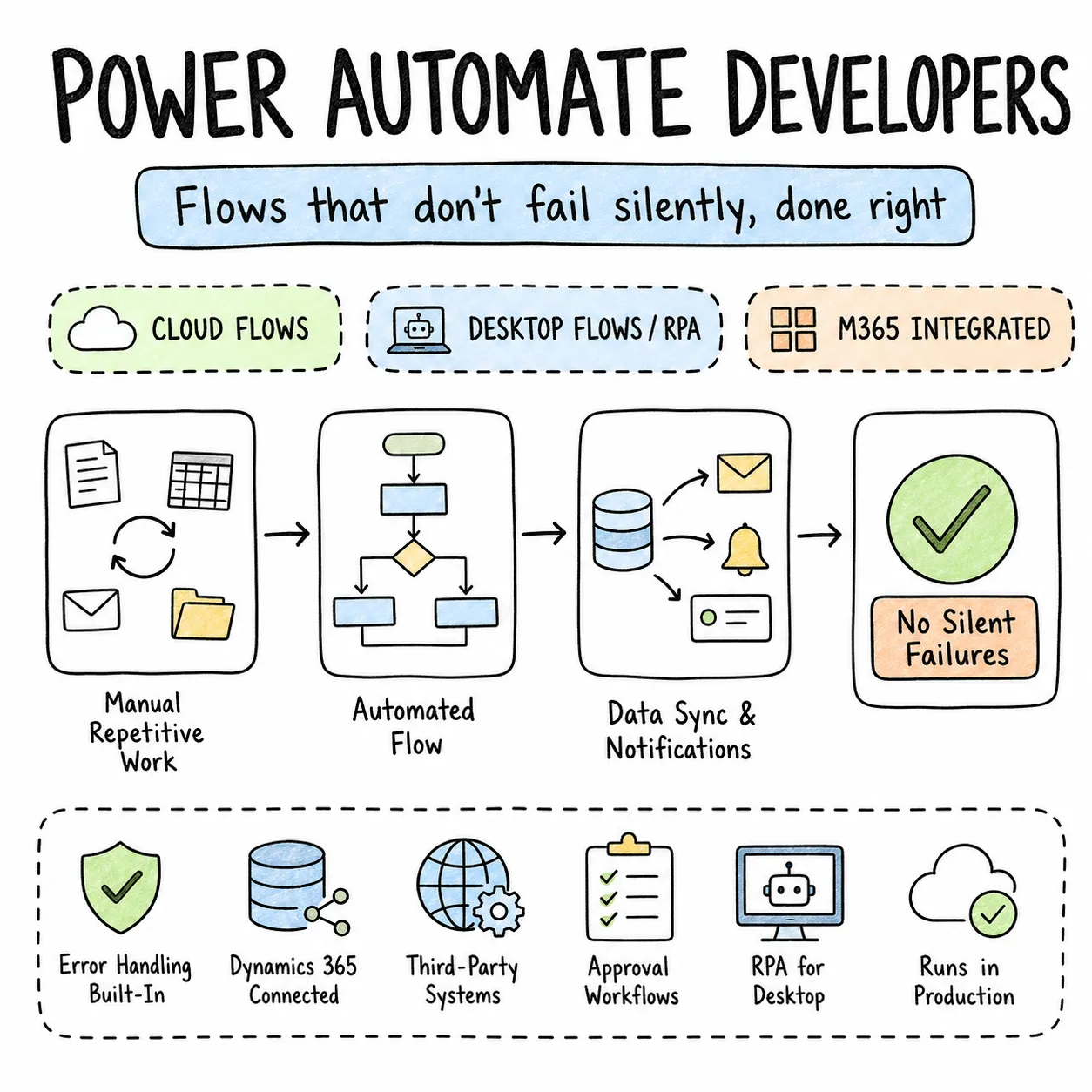
Flows that don'tfail silently. PowerAutomate done right.

Power Automate eliminates manual, repetitive business processes — approval workflows, data sync between systems, automated notifications, and RPA for desktop tasks. Our Power Automate developers have built production cloud flows and desktop flows for enterprise clients integrated across Microsoft 365, Dynamics 365, and third-party systems.

Vetted senior talent
Flexible engagement models
Founder-direct delivery
Why Entalogics

Why teams hire
Power Automate developers from us.

Our Power Automate developers build cloud flows for system integrations and approval workflows, scheduled flows for data processing and reporting, and desktop flows with Power Automate Desktop for RPA — automating legacy applications and desktop processes that have no API. They handle error handling, retry logic, parallel branching, and flow monitoring so automations run reliably in production — not just in demo environments.

EXPERT BENCH01

Expert Power Automate developers, only.

Vetted for production automation — scoped try/catch, run-after failure paths, throttling-aware connector usage, environment variables, solution packaging, and desktop RPA that survives UI changes. Not makers who built a notification flow and stopped.

FAST HIRING02

Fast hiring process.

People who can connect Outlook to Teams are everywhere. Power Automate developers who design approval chains with escalation, log failures to Dataverse, handle API limits, and document flows your IT team can maintain — that pool is small. We keep them ready.

FLEXIBLE ENGAGEMENT03

Flexible engagement.

Dedicated developer for a company-wide automation programme. Part-time specialist for flow maintenance and connector updates. Hourly consultant for a failure-path audit or Zapier-to-Power Automate migration. You choose.

Hiring model

Three ways
to staff your build.

Power Automate flows built without proper error handling, throttling awareness, and run history monitoring become maintenance problems within months. Our developers build flows that fail gracefully, alert the right people when something goes wrong, and are documented well enough that your IT team can maintain them — not just flows that work in the demo and break silently in production.

M01160h / mo

Full-time hiring

A dedicated Power Automate developer embedded in your team full-time — building cloud and desktop flows, integrating connectors, and managing solution deployment across environments. Best for organisations replacing manual processes at scale across departments.

M0280h / mo

Part-time hiring

20 hours per week of focused Power Automate work. Ideal for teams maintaining a portfolio of flows, adding error handling to legacy automations, onboarding new data sources, or migrating departmental Zapier workflows to Power Automate.

M0340h blocks

Hourly hiring

Targeted Power Automate consulting — flow failure audit, run-history review, desktop RPA feasibility assessment, custom connector setup, or environment and DLP alignment. Scoped, delivered, done.

Engagement models

Who runs
the project.

Pick the engagement model that fits how your team runs automation work — or talk to us and we'll suggest the right one.

01

Entalogics managed team

We own delivery end-to-end — process discovery, flow design, error handling, monitoring, and ALM deployment across environments. You review weekly and decide which processes get automated next.

  • PM + senior Power Automate devs on staff
  • We own the solution pipeline
  • Flow demos every Friday
02MOST COMMON

Client managed team

Your operations or IT lead sets priorities. Our Power Automate developer joins your Teams, your environment, your standups. They build and fix flows — you direct the automation roadmap.

  • Embedded in your Teams & environment
  • Reports into your ops or IT lead
  • Same hiring bar — you direct
03

Hybrid model

Your team handles business requirements and process ownership. Our Power Automate specialist handles the technical layer — connector architecture, failure paths, desktop RPA, and solution deployment.

  • Specialists from us, generalists from you
  • Shared standups + flow reviews
  • Clear DRI per workstream
Stack & tooling

Technologies our
Power Automate developers use competently.

Microsoft Power Automate ecosystem with enterprise integration and governance. Here's what our engineers work with daily.

Power Automate (Cloud)

Automated, instant, scheduled, and approval cloud flows.

Power Automate Desktop

RPA for legacy desktop apps and UI-driven processes.

Connectors

Standard and custom connectors across Microsoft 365 and SaaS.

Expressions

Conditions, variables, and dynamic content in flow logic.

COMMON QUESTIONS

Straight answers.

Six questions we get on every first call about hiring Power Automate developers. If yours isn't here, we'll cover it first.

Approval workflows, document routing, email automation, Teams notifications, data sync between systems, form submission processing, SharePoint list automation, HR onboarding, invoice processing, and any repeatable process currently done manually — with proper error handling so failures are visible, not silent.
Cloud flows automate API-connected systems and run in the cloud — approvals, notifications, cross-system sync. Desktop flows use RPA to automate legacy desktop applications and websites without an API — recorded or built in Power Automate Desktop. We recommend the right mix per process.
Yes. Over 900 connectors including Salesforce, SAP, ServiceNow, Slack, Gmail, and Jira — plus custom connectors for any REST API. We also combine Power Automate with Azure Functions when connector limits or transformation logic need a code layer.
Try/catch scopes, run-after configurations on failure paths, administrator alerts, and failure logging to SharePoint or Dataverse for audit trails. Every production flow has a defined on_failure path — not a green checkmark in the designer that hides partial runs.
RPA automates desktop UI interactions — clicks, keyboard input, screen reading — for systems with no API. Power Automate Desktop fits legacy ERPs, government portals, and vendor tools you cannot integrate via connector. We assess stability and maintenance cost before recommending RPA.
Yes. We map existing automations, rebuild them in Power Automate with proper error handling and environment variables, test in a non-production environment, and cut over with run-history monitoring — so nothing breaks silently on go-live day.
Founder-direct

Ready to build
something amazing?

Discuss your Power Automate needs with Entalogics — quality delivery at fair pricing.