
JULY 17, 2026
Windows App SDK 2.2 Updates for Enterprise Apps
Windows App SDK 2.2 adds VideoScaler, unpackaged app data access, and XamlBindingHelper fixes that change enterprise desktop app packaging and AI flows.

By Asad, Senior Content Writer at Entalogics · Software Development
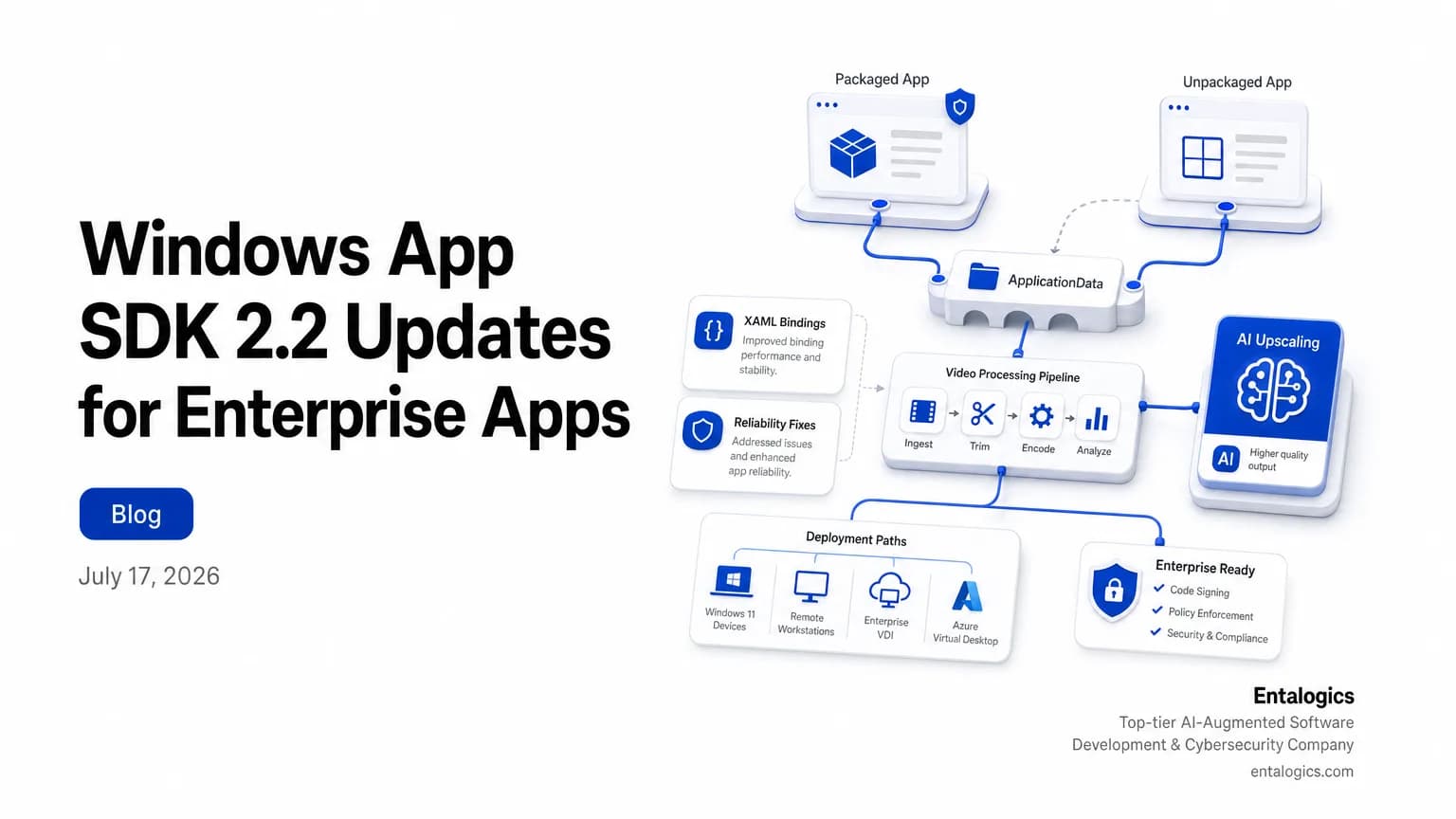
Windows App SDK 2.2 changes the desktop app baseline
Windows App SDK latest stable release is 2.2.0. That matters because this release is not just a small patch. It changes how enterprise desktop teams think about packaging, app data, and AI video features in one update.
The July 2026 highlights list 3 listed changes: VideoScaler, ApplicationData.GetForUnpackaged(), and new XamlBindingHelper overloads. Microsoft also says the page was last updated on 2026-07-03, which makes this the current reference point for teams planning a migration or a platform refresh.
Windows App SDK 2.2 gives unpackaged apps a first-class WinRT entry point.
If you maintain a desktop app that still ships outside MSIX, that one change is the most practical part of the release. It reduces one long-standing gap between packaged and unpackaged apps.
Windows App SDK 2.2 for enterprise desktop packaging
The packaging story is the clearest enterprise update in this release. ApplicationData.GetForUnpackaged() exposes 1 previously packaged-only surface exposed to unpackaged apps. It targets 2 storage scopes: per-user and per-machine application data.
That sounds modest. It is not. For teams that have stayed unpackaged because of deployment constraints, this closes a real feature gap. The release notes also say it simplifies 1 migration direction explicitly named: packaged to unpackaged migration. They also say it removes 1 class of workaround removed: Registry-API workarounds.
That is useful in two situations.
First, if your app started life as a packaged Windows app but some customers now want a looser enterprise install model, you can move data handling without rewriting storage code around the registry.
Second, if your app has always been unpackaged, you now get a more direct WinRT route for app data storage. That makes future migration paths simpler if you later decide to package the app for managed deployment.
The release notes say this simplifies future packaged ↔ unpackaged migration and removes the need for Registry-API workarounds.
For teams comparing this to other desktop platform shifts, the pattern is familiar. Enterprises usually do not want a flashy new stack. They want fewer deployment surprises. That is why a storage API update can matter more than a bigger headline feature.
If you are still deciding whether packaging belongs in your roadmap at all, see Desktop Workflows Still Matter in Real Estate Tech. It covers why desktop app constraints still shape real enterprise software decisions.
VideoScaler and the new AI video API
The other headline in Windows App SDK 2.2 is VideoScaler. Microsoft says the latest stable release adds 1 API for real-time AI video upscaling.
The GitHub release notes add more detail. VideoScaler supports 3 customizable output settings: output resolution, frame rate, and regions of interest. It also supports 3 formats named: BGR, RGB, and NV12.
That combination gives app teams a very specific tool. You can tune the output for different device classes, camera pipelines, or video workflows without building the upscaling path from scratch.
There is one more detail that matters to platform teams: VideoScaler requires 0 explicit Windows ML initialization steps required. In practice, that lowers the setup burden for developers who want AI-assisted video features but do not want to manage an extra initialization path.
For enterprise apps, this is less about consumer-style video polish and more about internal utility. Think inspection tools, remote support clients, training apps, or capture workflows that need cleaner video without a separate inference stack.
If your team is already evaluating AI features inside Windows apps, pair this release with Enterprise AI Agents: How to Secure Them in 2026. The security questions change fast once AI outputs affect UI, media, or decision support.
Ship faster with senior engineers
Direct collaboration, AI-augmented delivery, and no agency markup.
Get in touchXamlBindingHelper and UI performance updates
The third major area in the release is XAML.
Windows App SDK 2.2.0 adds 3 overloads to XamlBindingHelper: SetPropertyFromThickness, SetPropertyFromCornerRadius, and SetPropertyFromColor. It also exposes 1 dependency property: Setter.ValueProperty.
These are small API additions, but they point to the kind of issues that show up in real apps: styling, binding, and UI churn. The release notes describe these overloads as boxing-free value setters. That is the right word to notice. In UI code, less object churn can mean cleaner binding paths and fewer avoidable performance costs.
The GitHub notes also say the release includes a batch of WinUI and Windows ML reliability fixes, and Microsoft Learn summarizes that as 1 batch of fixes. That tells you the release is not only about new surface area. It also tightens the existing one.
For desktop teams, this is the practical way to read the update: if your app relies on XAML-heavy screens, the new binding helpers are worth reviewing even if you do not adopt VideoScaler right away.
Windows App SDK 2.2 adds 3 boxing-free value setter overloads and exposes 1 dependency property.
If your codebase has a large XAML layer, this is also a good moment to review your packaging strategy alongside your UI update plan. A clean binding layer does not help if deployment is brittle.
What changed in the 2.2.0 release notes
The GitHub release notes describe Windows App SDK 2.2.0 as the latest stable servicing release for 2.0 servicing line. They also list 4 namespaces/groups named in the new or updated APIs section since 2.1.3: Microsoft.UI.Xaml.Setter, Microsoft.UI.Xaml.Markup.XamlBindingHelper, Microsoft.Windows.AI.Video, and Microsoft.Windows.Storage.ApplicationData.
That grouping is a useful roadmap. It shows exactly where Microsoft wants developers to look:
- packaging and storage
- XAML binding helpers
- AI video
- reliability fixes around WinUI and Windows ML
The bug-fix list is also not tiny. The release notes list 8 bug fixes under the Bug fixes section. For teams that wait for a stable servicing release before upgrading, that is usually the real trigger. New APIs are interesting. Fixes are what get a change window approved.
The stable release itself was published on June 9, 23:30. That date matters if you are mapping it against your own release calendar, because platform updates often land close to other enterprise deadlines.
If you need a broader view of how platform shifts affect developer workflows, What Is AI-Augmented Software Development? A Complete Guide is a good companion read. It helps frame how AI features move from novelty to product infrastructure.
What enterprise teams should do next
Start with packaging. If your app is unpackaged today, test ApplicationData.GetForUnpackaged() on a branch and confirm how it maps to your current storage model. If your app is packaged, check whether the new surface removes any custom registry logic you still carry.
Then review AI video usage. If your product uses webcam, camera, or media ingestion, evaluate whether VideoScaler can replace any internal upscaling path. Focus on output resolution, frame rate, and regions of interest first, because those are the knobs Microsoft explicitly exposed.
Then audit XAML code paths. The new binding helpers and Setter.ValueProperty are small changes, but they are easy wins if you have a style-heavy UI or a lot of repeated property conversion code.
Finally, validate the release notes against your own rollout process. The update includes 8 bug fixes, but you still need regression coverage for packaging, storage, and media paths before you deploy it to enterprise users.
If you want a structured review of where these changes touch your app, the right next step is an AI Code Security Audit for the parts of your desktop stack that now depend on AI or new platform APIs.
The takeaway is simple: Windows App SDK 2.2 is not just a version bump. It narrows the gap between packaged and unpackaged apps, adds a real AI video API, and cleans up XAML binding work that enterprise teams feel every day. Update with a test plan, not a hope.