
AUGUST 25, 2026
Cloudflare Now Tracks SPA Soft Navigations
Soft navigations in SPAs now change Cloudflare Web Analytics counts, with new measurement paths, fallback APIs, and LCP support in Chrome.

By Asad, Senior Content Writer at Entalogics · Programming
Soft navigations are now changing SPA reporting
Cloudflare Web Analytics is rolling out accuracy improvements to client-side soft navigations, and that shift changes how enterprise teams will read pageview data in SPAs. The company says the update may alter the volume of pageviews reported in the dashboard and GraphQL API, depending on front-end architecture and visitor traffic patterns.
That matters because SPAs already blur the line between page loads and in-app transitions. A visitor can click a link, submit a form, or move through a routed view without a full reload. If your reporting still treats every journey like a hard navigation, your dashboards will miss part of the path.
Cloudflare says the update may alter the volume of pageviews reported in the dashboard and GraphQL API.
The change is also a measurement story, not just a product note. Google Chrome's new Soft Navigation API natively measures Largest Contentful Paint on soft navigations, which removes a blind spot in perceived loading speed across pageviews. Cloudflare is aligning its analytics model with that browser behavior instead of forcing SPA journeys into a hard-navigation bucket.
For teams that track performance, conversion, or user flow in React, Angular, Vue, or Svelte apps, this is the kind of update that can make a quarter-over-quarter chart look wrong unless you know what changed.
What counts as a soft navigation in SPA analytics
Cloudflare defines a soft navigation as a client-side update after the visitor clicked a link or submitted a form, but JavaScript intercepted the navigation and handled the change in place. That definition matters because it separates visible content changes from traditional page loads.
The company also notes that any client-side navigation counts as a soft navigation, including navigations intercepted by the Navigation API or triggered by the History API. In other words, the browser can change state, update the view, and move the user forward without the old full-page reload pattern.
Cloudflare's SPA tracking documentation says Web Analytics automatically tracks user interactions on SPAs via 3 methods depending on browser support:
- Using the Soft Navigations API
- Listening on
navigateevents via the Navigation API - Patching the History API's
pushStatefunction and listening to theonpopstateevent
That fallback stack is the real operational point. Enterprise teams rarely live in one browser family, one framework, or one release channel. They need a measurement layer that can follow users across modern browsers and older ones without splitting the story into separate tools.
Cloudflare's dimensions page gives the same idea a simpler label. It defines Soft Navigation as a client-side update after a clicked link or submitted form, measured via the native Soft Navigation API. It defines Routing APIs as the fallback method when the Soft Navigation API is not supported.
Chrome's Soft Navigation API natively measures Largest Contentful Paint on soft navigations.
Cloudflare's new navigationType values
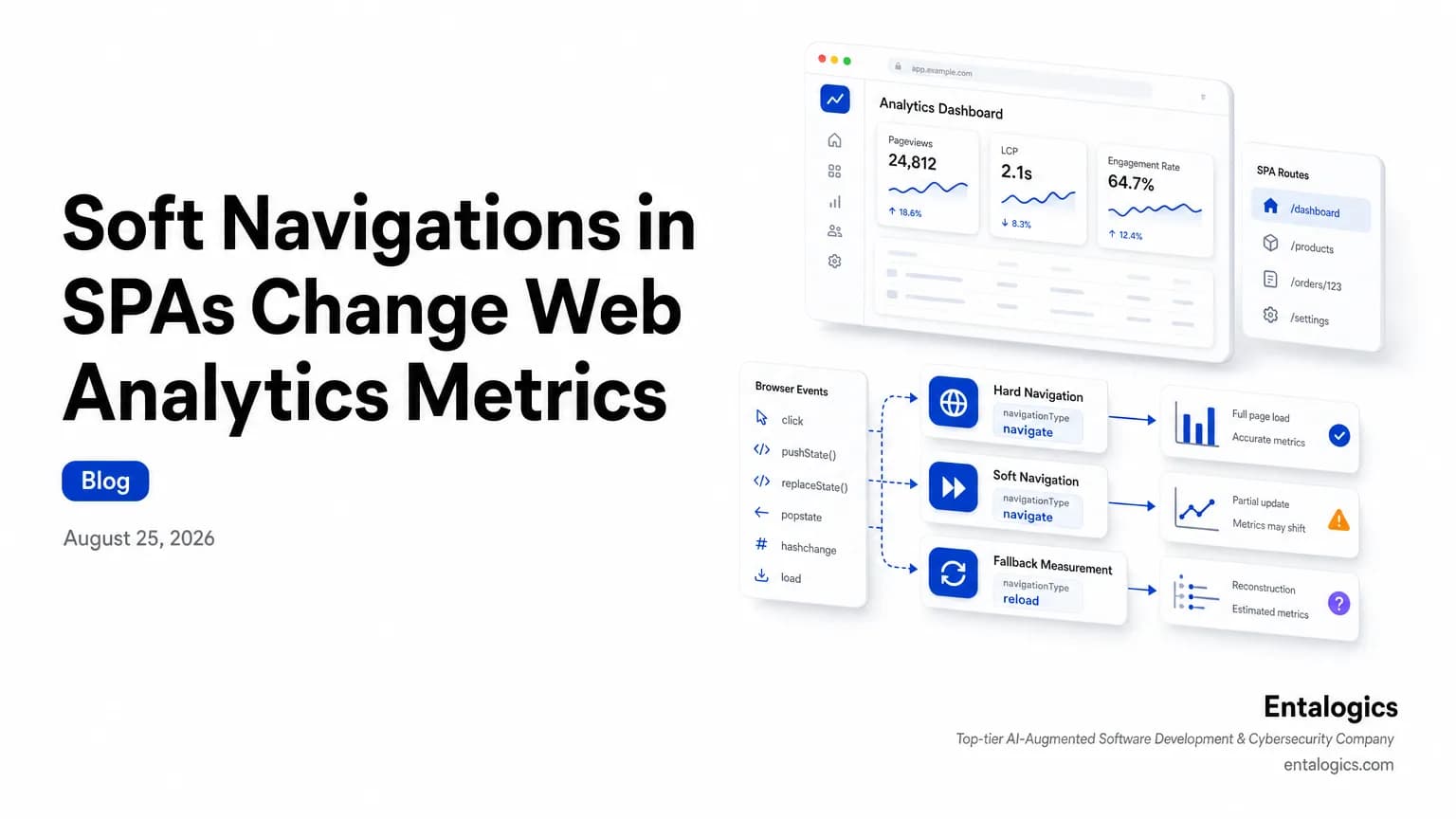
Cloudflare extended navigationType to segment navigations into 3 values: navigate, soft-navigation, and routing-apis.
That split is useful because it makes the hidden shape of SPA traffic visible.
navigatecovers hard navigations that traditional websites, or multi page applications, perform when clicking links or submitting forms.soft-navigationis used where the new Soft Navigation API is available and the visitor makes a client-side navigation.routing-apisis used where the native Soft Navigation API is unavailable, and Cloudflare falls back to the Navigation API or History API.
Before this change, Cloudflare says it only used 1 prior API and all navigations were bucketed into navigate.
That old model made analysis simpler, but it also flattened distinct user experiences into the same bucket. If a visitor clicked through a routed dashboard, that journey could look the same as a full page refresh. If you use the data to judge performance, conversion, or content engagement, that flattening can hide where the friction really is.
The new breakdown also helps explain platform differences. Cloudflare says that where the native Soft Navigation API is unavailable, it falls back to measuring soft navigations using the Navigation API or History API. It also says it cannot collect LCP for routing-apis, but the other Core Web Vitals are present.
For analysts, that means the absence of one metric is now explicit. For engineers, it means browser support affects the completeness of the performance record.
Why pageview counts may move
The most immediate operational effect is not philosophical. It is numerical.
Cloudflare says the change may alter the volume of pageviews reported in the dashboard and GraphQL API. That can happen because a SPA journey that used to be lumped into navigate may now be measured as soft-navigation or routing-apis, depending on browser support and the navigation path.
That matters to teams that use pageviews as a proxy for product usage, content reach, or funnel health. If the count shifts after a measurement change, the first question is not whether traffic changed. The first question is whether the definition changed.
This is especially important in enterprises with mixed stacks. A single product area may include React for one surface, a server-rendered admin area for another, and embedded app shells or micro frontends in between. Cloudflare's new model can capture those differences more honestly, but it can also make historical comparisons noisier unless you segment by navigation type.
If your team is already trying to make sense of SPA telemetry, a web analytics audit may help you separate product behavior from measurement artifacts, especially when dashboard trends do not line up with user-reported journeys.
The practical workflow is straightforward:
navigate, soft-navigation, and routing-apis.None of that requires guessing at the cause. It just requires reading the new data model correctly.
Ship faster with senior engineers
Direct collaboration, AI-augmented delivery, and no agency markup.
Get in touchWhat enterprise teams should audit now
Start with your front-end architecture. Cloudflare's note applies to SPAs built with 4 frameworks named: React, Angular, Vue, or Svelte. If you run one of those stacks, you should assume soft navigation reporting matters to you.
Then map how your app actually moves users around. Ask three questions:
- Which journeys are handled by the native Soft Navigation API?
- Which ones fall back to the Navigation API?
- Which ones still depend on the History API?
That map tells you where Cloudflare will record soft-navigation and where it will use routing-apis. It also tells you where the data will not include LCP.
This is the point where product, engineering, and analytics should sit together. Product wants to know if users are moving through the app. Engineering wants to know if the browser support is broad enough. Analytics wants to know whether a chart change reflects a real behavior change or a new measurement path.
You should also audit your dashboards for assumptions baked into hard-navigation data. If a report was built when all navigations landed in navigate, it may now mix unlike journeys. Re-labeling the metric is not enough. The downstream dashboards need the same care.
For teams that want to understand how browser changes and app architecture interact, our earlier piece on browsers before and after AI is a useful companion read. It covers how browser behavior shifts can change the meaning of product telemetry.
The bigger lesson for SPA measurement
Soft navigation reporting is not a niche browser detail. It is a reminder that modern web apps no longer fit cleanly into page-load thinking.
When users move through an SPA, they still experience a journey, but the browser may not create the same signals that older analytics systems expect. Cloudflare's update reduces that mismatch. Chrome's Soft Navigation API adds native LCP support for those transitions. Cloudflare's fallback model keeps older browsers in view.
That is good news for teams that care about measurement quality. It is also a warning. If your org uses pageviews, Core Web Vitals, or route-level analytics to make product decisions, you need to know which navigations are hard, which are soft, and which are only approximated by fallback APIs.
The most useful response is not to freeze the dashboard. It is to annotate the change, segment the data, and communicate that the metric now means something slightly different than it did last week.
If you publish or maintain SPAs, make this part of your regular review:
- Confirm which navigation paths use the native Soft Navigation API.
- Track how many journeys fall back to the Navigation API or History API.
- Watch for pageview shifts after the analytics update.
- Check whether LCP coverage is complete where you expect it.
That gives you a cleaner baseline and fewer false conclusions.
Takeaway for web performance teams
Cloudflare's new SPA measurement model is a sign that analytics is catching up to how users actually move through modern apps. The change will likely move pageview counts, split navigations into 3 values, and expose where LCP is available versus where it is not.
Treat that as a measurement update, not a traffic mystery. Segment by navigation type, compare before and after, and make sure your dashboards reflect the new definitions. If the numbers matter to product, performance, or reporting, the model behind them matters just as much.