
AUGUST 24, 2026
Browsers Before AI vs. Now: What Changed
See how web browsers changed from simple click-and-search tools into AI agents that book, shop, and fill forms for you — and what to watch out for.

By Asad, Senior Content Writer at Entalogics · Chromium & Browser Development
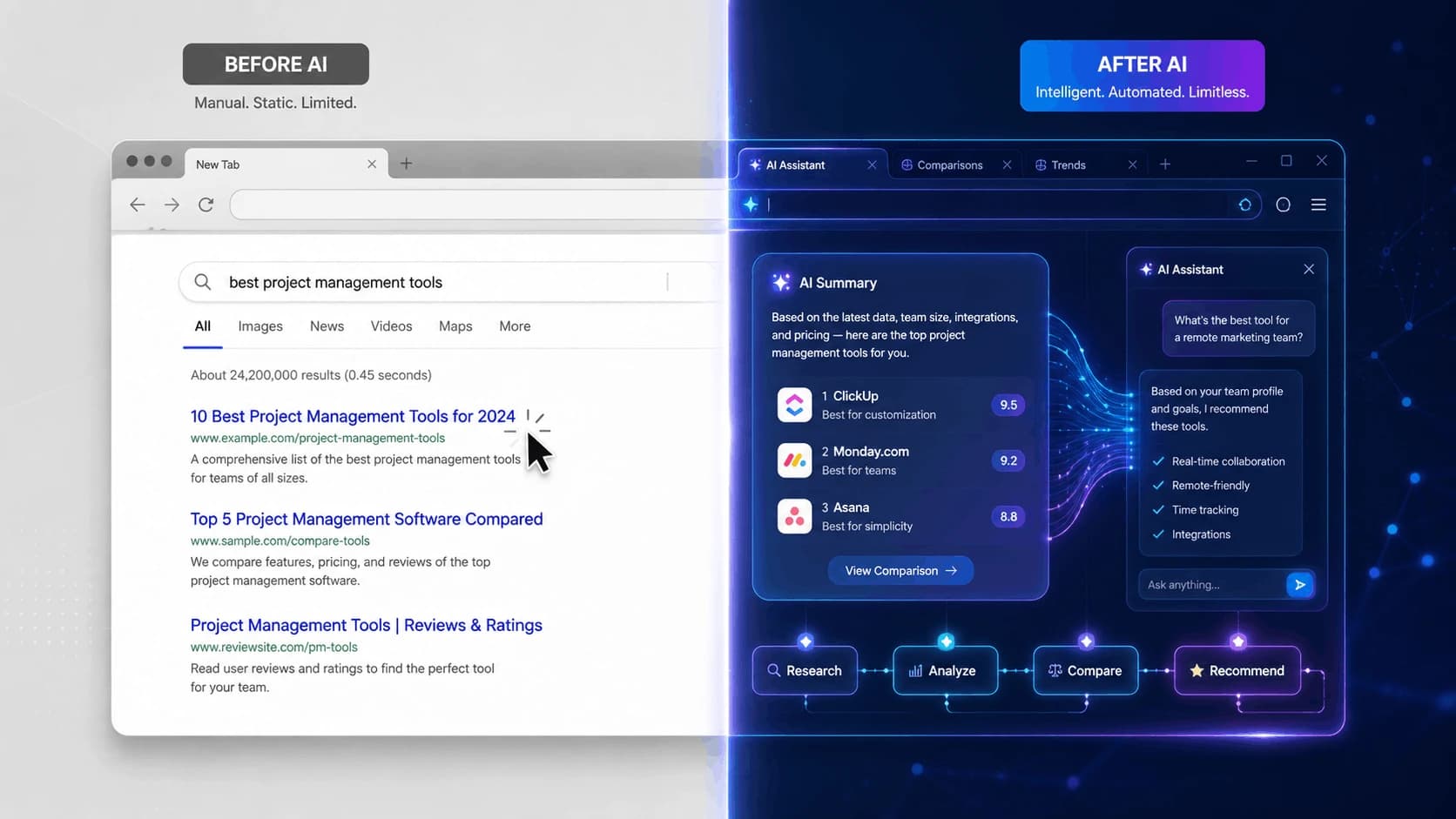
If you haven't paid close attention to browser updates over the past couple of years, here's the short version: the thing you use to check email, shop, and scroll the news has quietly turned into something that can do a lot of that for you. Not "for you" in a marketing-buzzword way — actually clicking buttons, filling in forms, and finishing tasks while you sit back.
Here's what browsing actually looked like before AI showed up, what changed, and what it means day to day.
Browsing before AI: you did every step yourself
Think about how you used a browser as recently as 2023 or 2024. You opened a tab, typed a search, scanned a page of blue links, clicked one, read (or skimmed) the page, and if it wasn't what you needed, hit back and tried again. Booking a flight meant opening three or four airline sites yourself, comparing prices by eye, and filling out the same passenger details on each one by hand. Returning a package meant finding the right page, logging in, locating the order, and clicking through a multi-step form.
The browser's job, in other words, was to show you things. Every decision — what to click, what to compare, when you were done — was on you. Extensions could block ads or save passwords, but nothing was reading a page and acting on it the way a person would.
The first shift: a chatbot that could talk about the page
The earliest wave of "AI in your browser" was a sidebar you could open and ask questions. You'd be reading a long article or a dense PDF, open the sidebar, and ask "what's the main point of this" or "summarize the pricing section." It was genuinely useful, but it was passive — the AI could tell you about a page. It still couldn't touch anything on it. You were still the one clicking, scrolling, and filling in forms.
The shift that actually changed things: browsers that act on your behalf
What's different now is that the AI in your browser isn't limited to talking anymore. Give it a goal in plain language — "find me the cheapest flight to Chicago next weekend" or "add this recipe's ingredients to my grocery cart" — and it can navigate between sites, read what's on the page, fill out the form fields, and click through the steps itself. The industry has a name for this now: agentic browsing. You're no longer just being shown information. The browser is doing the errand.
This is a bigger deal than it sounds, because it's now baked into browsers a lot of people already use, not some obscure extension:
- Chrome with Gemini is now the largest deployment of this kind of AI browsing, built into Chrome for Google's AI Pro and Ultra subscribers.
- Microsoft Edge folded its AI features directly into the everyday browser in 2026 rather than keeping them behind a separate "Copilot Mode" toggle — so if you use Edge, you likely have some version of this already, whether you asked for it or not.
- Perplexity's Comet browser bundles this kind of task automation with search, and it's free on desktop, Android, and iOS.
- Dia, from The Browser Company, was built AI-first from day one rather than bolting AI onto an existing browser.
Not everyone jumped in the same way, and that's worth knowing if you're choosing between browsers. Firefox added an AI Window that you have to turn on yourself — it's not the default experience. Safari's approach has stayed narrow on purpose: its one real agentic feature is Apple Intelligence automatically fixing weak or compromised saved passwords, not general web automation. And Vivaldi went the opposite direction entirely, marketing itself as the browser that stays human-run, for anyone who'd rather not have an AI clicking things on their behalf at all.
There's also a quieter trend worth knowing about if you're picking a browser right now: standalone "AI browser" apps built from scratch are struggling to stick around. OpenAI's ChatGPT Atlas, one of the most hyped AI browser launches, is being shut down, with its features moving into the regular ChatGPT app and a Chrome extension instead. The pattern seems to be that people don't want to switch browsers for AI features — they want the browser they already use to just have them.
Ship faster with senior engineers
Direct collaboration, AI-augmented delivery, and no agency markup.
Get in touchWhat this means for you, practically
Before AI, if something went wrong while shopping or booking — a wrong date, a bad address, an accidental double order — it was because you clicked the wrong thing. Now, if you let an AI agent complete a task for you, it's the one clicking, and that changes what you need to watch for.
A few things worth knowing before you let a browser act on your behalf:
Check what it actually did, not just what it says it did. Agentic browsing is still new technology, and it can misread a page or misunderstand your request the same way a person skimming too fast might.
Be more careful with tasks that touch money or sensitive accounts. Letting an AI summarize an article is low-risk. Letting it log into your bank or complete a purchase is a different level of trust, and it's fair to double-check those results yourself, especially early on.
Know that this is genuinely new territory, security-wise. Researchers at the University of Washington tested seven major agentic browsers and found that four of them — including ChatGPT Atlas, Chrome with Gemini, Claude for Chrome, and Perplexity Comet — could be tricked into leaking data across sites that should have stayed separate, through a malicious webpage hiding instructions the AI would follow without you seeing them (a trick called prompt injection). Firefox's more limited AI Mode came out safest, mainly because it does less. As one of the researchers, David Kohlbrenner, put it: "Even if you're a relatively savvy user, if these agents have access to a browser that contains your credentials — your email, your bank account, whatever it is — you should not trust that these systems are ready to truly protect your information."
That's not a reason to avoid these tools — it's a reason to use them the way you'd use any new convenience that touches your accounts: try it on low-stakes tasks first, keep an eye on what it's doing, and be a little more hands-on with anything involving money or personal data until the track record is longer.
The bottom line
Before AI, a browser showed you the internet and you did the work. Now, for a growing number of everyday tasks, you can describe what you want and the browser does a good chunk of the clicking. That's a real convenience — it's also new enough that a little caution goes a long way, especially with anything sensitive.
If you're weighing which of these tools to actually trust with your accounts and data, or just want a second opinion on what's safe to hand off to an AI agent versus what to keep doing yourself, that's the kind of practical question our team at Entalogics fields regularly.