Fast, secure WordPress.No plugin bloat.

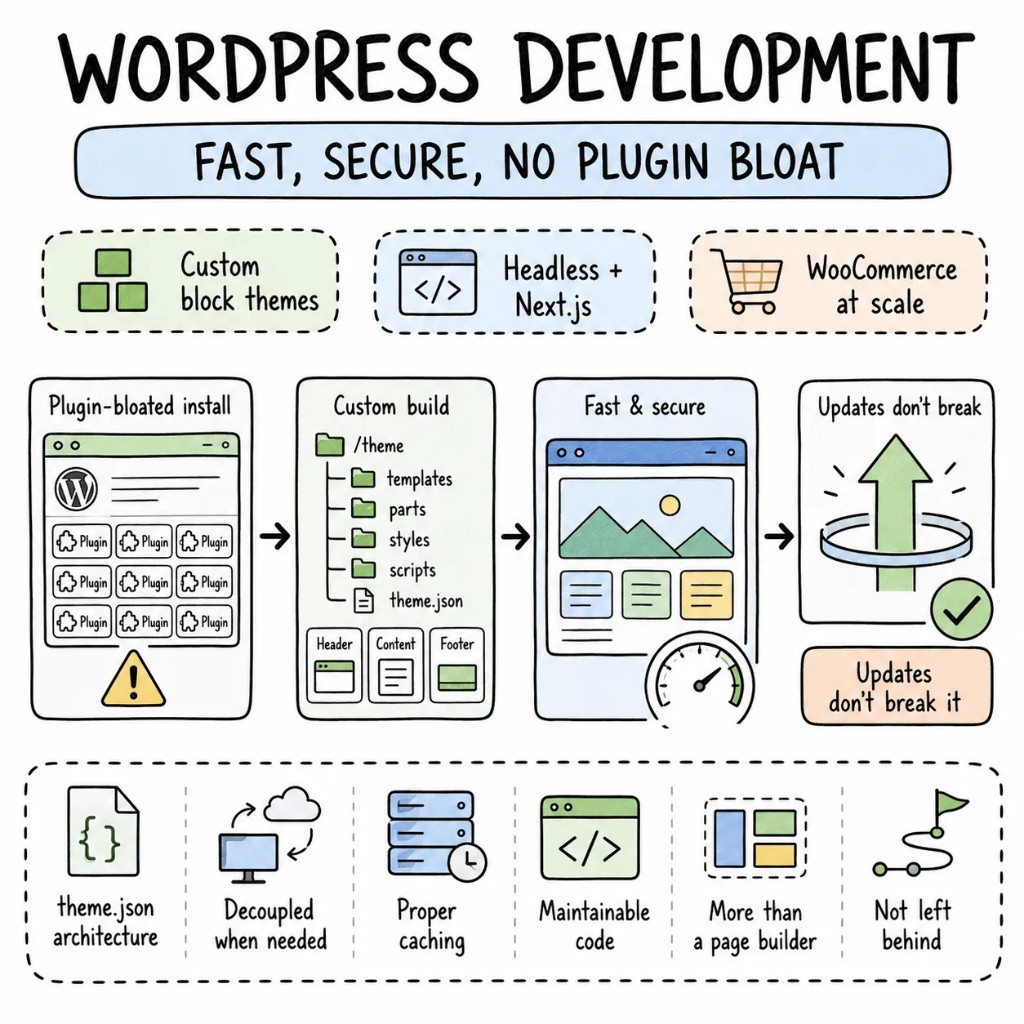
WordPress development services for teams that need more than a page builder and a prayer. Custom block themes with theme.json architecture. Headless WordPress with Next.js when performance demands decoupling. WooCommerce at scale with proper caching. We build WordPress that's fast, secure, and maintainable — not the plugin-bloated, update-breaking installations most agencies leave behind.

  • Block themes
  • Headless WP
  • WooCommerce
  • Sub-1s LCP

Why Entalogics for WordPress

Four things every
WordPress site
actually needs.

The WordPress sites we inherit always tell the same story — 40 plugins where 12 would do, no caching strategy, a theme from 2019 that breaks on every core update, and security practices that amount to hoping nobody finds the login page. WordPress is powerful. Most installations are liabilities.

Performance01

Sub-1s LCP is achievable on WordPress. Most sites don't try.

Object caching with Redis, page caching at the edge, image optimisation via WebP/AVIF, lazy loading, and critical CSS inlining. We've taken WordPress sites from 4s LCP to under 800ms without changing the content — just the infrastructure and theme architecture.

Architecture02

Block themes or headless. Not page-builder spaghetti.

Block themes with theme.json for editorial flexibility with design guardrails. Headless WordPress with Next.js or Astro when the frontend needs to be decoupled. Page builders only when the editorial team genuinely needs them — and even then, properly configured.

Security03

WordPress security is a practice, not a plugin.

Core, theme, and plugin auto-updates enabled. Unused plugins removed — not deactivated. Login URL changed. 2FA enforced. WAF configured. File permissions hardened. No security-through-obscurity. Real security through discipline.

Type safety04

Typed custom fields. Structured content. Not freeform HTML.

ACF Pro or custom block types with typed fields. Content structured in custom post types with defined schemas. When the design changes, the content migrates cleanly — because it was structured from day one, not pasted into a WYSIWYG.

When WordPress, when not

WordPress is a tool.
Not always the right CMS.

WordPress powers 43% of the web. That doesn't mean it powers 43% of it well. We'll tell you on the first call if WordPress is the right CMS — or if a headless CMS, static site generator, or custom app serves your content better.

PICK WORDPRESS WHEN

  • Content teams need an editor they already know — WordPress's editing UX has 20 years of muscle memory
  • WooCommerce fits your e-commerce needs — product catalogue, cart, checkout, subscriptions
  • SEO and content marketing are primary drivers — WordPress + Yoast + structured data is battle-tested
  • Budget matters — WordPress is free, hosting is cheap, and the plugin ecosystem covers 90% of needs

CONSIDER ALTERNATIVES WHEN

  • Performance is non-negotiable and the content team can adopt a new editor — Sanity, Contentful, or Storyblok with Next.js or Astro deliver faster frontends
  • The site is a web application, not a content site — WordPress isn't an app framework
  • Security surface needs to be minimal — WordPress's plugin ecosystem is its strength and its largest attack vector

WE SAY NO WHEN

  • "WordPress for our SaaS dashboard." That's not a CMS problem.
  • "Install 50 plugins and hope they don't conflict." That's a maintenance nightmare, not a website.
  • "WordPress because it's free." The CMS is free. The maintenance of a poorly built site isn't.

What we build with WordPress

Six product surfaces.
One quality bar.

The shapes of WordPress development we deliver most. Each fast, secure, and built to survive core updates.

  • S01

    Content & marketing sites

    Blog, landing pages, resource libraries, gated content. Block theme with theme.json, Yoast SEO, structured data, edge caching. Sub-1s LCP on every page.

    WORDPRESSBLOCK THEMEYOASTREDIS
  • S02

    WooCommerce stores

    Product catalogue, cart, checkout, subscriptions, payment integration. WooCommerce configured for performance — not the default install that crashes at 500 products.

    WOOCOMMERCESTRIPEREDISCLOUDFLARE
  • S03

    Headless WordPress + Next.js

    WordPress as the content backend, Next.js as the frontend. WPGraphQL or REST API. Sub-500ms page loads. Editorial teams keep WordPress. Users get a modern web experience.

    WPGRAPHQLNEXT.JSACF PROVERCEL
  • S04

    Multisite networks

    WordPress Multisite for franchise, education, or media networks. Shared plugins and themes, per-site customisation, centralised updates.

    MULTISITENETWORK ADMINDOMAIN MAPPINGREDIS
  • S05

    Custom plugin development

    Purpose-built plugins for business logic that no existing plugin handles. Properly hooked, update-safe, and coded to WordPress standards — not a functions.php dump.

    CUSTOM PLUGINSREST APIACF PROPHPUNIT
  • S06

    WordPress migrations & upgrades

    Classic themes to block themes, PHP 7 to PHP 8.3, page builder to Gutenberg, shared hosting to managed cloud. Site stays live throughout.

    BLOCK THEMESPHP 8.3WP ENGINEMIGRATION

The playbook

Patterns we
ship on repeat.

WordPress patterns from real production sites — not ThemeForest installs.

  • P01

    Block theme with theme.json

    Typography, colours, spacing defined in theme.json. No custom CSS overriding everything. The Site Editor gives content teams flexibility within design guardrails.

  • P02

    Plugin audit and reduction

    Every plugin justified. Unused plugins deleted — not deactivated. Functionality that five plugins provide consolidated into one custom solution where appropriate.

  • P03

    Object caching with Redis

    Redis for persistent object caching. Page caching via Cloudflare or WP Super Cache. Database queries that hit cache first. The difference between 200ms and 2,000ms TTFB.

  • P04

    Structured content with ACF

    Custom post types with ACF field groups. Content structured in typed fields — not pasted into the block editor as freeform HTML. Content that migrates cleanly when the design changes.

  • P05

    Security hardening

    Auto-updates enabled. Login URL changed. 2FA enforced on all admin accounts. File permissions 644/755. XML-RPC disabled. REST API restricted to authenticated users where appropriate.

  • P06

    CI/CD for WordPress

    Git-based deployments via GitHub Actions or Buddy. No FTP. No editing themes in production. Staging environment for testing before every deploy.

Signature case

A media site,
rebuilt from page-builder chaos to a block theme.

A B2B media company on WordPress — Elementor with 38 templates, 42 plugins, 3.8s LCP, no caching, a theme that broke on every WordPress update, and a hosting bill climbing because the server couldn't handle the traffic. Rebuilt with a custom block theme, Redis caching, Cloudflare CDN, and reduced to 16 plugins in 9 weeks. LCP dropped to 0.7s. Hosting cost dropped 60%.

Before

Elementor · 42 plugins · LCP 3.8s · no caching · $420/mo hosting

After

Block theme · 16 plugins · LCP 0.7s · Redis + Cloudflare · $168/mo hosting

  • LCP improvement−82%
  • Plugin count42 → 16
  • Hosting cost−60%
  • To fully rebuilt9wk

Engagement shape

Eight to ten weeks
to a measurable ship.

A typical WordPress development engagement. We build or rebuild page by page — the current site stays live while we work.

  • W01

    Audit + RFC

    Two senior WordPress developers. Plugin audit, performance profiling, security scan, theme architecture review. A ranked, dollarized RFC.

  • W02–03

    Foundation + first templates

    Block theme baseline, theme.json configured, Redis caching live, first page templates built end-to-end. Real Lighthouse scores on the deployed URL.

  • W04–08

    Template by template

    Pages migrated, plugins consolidated, content restructured. The current site stays live throughout.

  • W09+

    Launch + handoff

    DNS switched. Redirects configured. Security hardened. Runbook handed to your team — or we stay on retainer.

Stack

Tools we
reach for first.

Our default WordPress development stack — picked for production, not tutorials.

  • CMSWordPress 6.x · Block Editor · Full Site Editing · ACF Pro
  • E-commerceWooCommerce · Stripe · Subscriptions · Product Bundles
  • HeadlessWPGraphQL · Next.js · Astro · Faust.js
  • PerformanceRedis · Cloudflare · WP Super Cache · Imagify
  • SecurityWordfence · 2FA · Sucuri · Hardening best practices
  • InfraWP Engine · Kinsta · Cloudways · GitHub Actions

Engagement

Three ways
to work with us.

No hourly retainer that bills for "thinking time." Pick a lane that matches your stage; everything is fixed-quote or transparently rated.

FIXED SCOPEone-off build

Ship a WordPress site, end-to-end.

A defined scope, a fixed price, a senior-only team. From RFC to launched site in 6–12 weeks.

$15k–$30k

FIXED SCOPE

  • Senior engineers only
  • Fixed quote in week 1
  • Code, infra, runbook — yours
Plan a fixed build
DEDICATED TEAMmonthly

Hire dedicated WordPress developers.

Embedded engineers in your Slack, your standups. Senior WordPress and WooCommerce engineers. Pause, resize, end with 30 days' notice.

$5k / eng / mo

PER ENGINEER

  • Same senior bar as fixed-scope
  • Embedded in your team
  • Founder-direct escalation
Hire dedicated WordPress devs
ENGAGEMENTcustom

Strategic WordPress partnership.

A long-term partner for content organisations — performance optimisation, headless migration, WooCommerce scaling, security hardening, hiring help.

custom

PROCUREMENT-FRIENDLY

  • Multi-quarter roadmap
  • Architecture & hiring partner
  • Procurement-friendly paper
Speak to the founder
FAQ

Sharp questions,
straight answers.

Block themes vs page builders, headless vs traditional, security — the questions we get on every WordPress discovery call.
Block theme for new builds — it's WordPress's direction, faster, and more maintainable. Keep the page builder only if your editorial team depends on it and migration cost isn't justified. We migrate incrementally — block theme templates alongside existing page builder pages.
Traditional for most content sites — the editing experience is better and the complexity is lower. Headless when you need sub-500ms performance, a React/Next.js frontend, or multi-channel content delivery. Headless adds real cost and complexity — we'll tell you if it's justified.
Auto-updates, plugin reduction, 2FA enforcement, hardened file permissions, WAF configuration, and login protection. Security is a practice built into the development and hosting — not a plugin you install and forget.
Yes. The engineers who write the RFC ship the site. No handoff mid-engagement. Direct access throughout.
Yes. We audit plugins, profile performance, and improve incrementally. If a theme needs replacing, we migrate template by template. The live site stays up throughout.

Founder-direct

Tell us whatyou're building.

Thirty minutes with the founder. We'll bring a senior WordPress developer, the relevant playbook, and a candid read on whether WordPress is the right CMS — or whether a headless CMS or static site generator fits your content better.