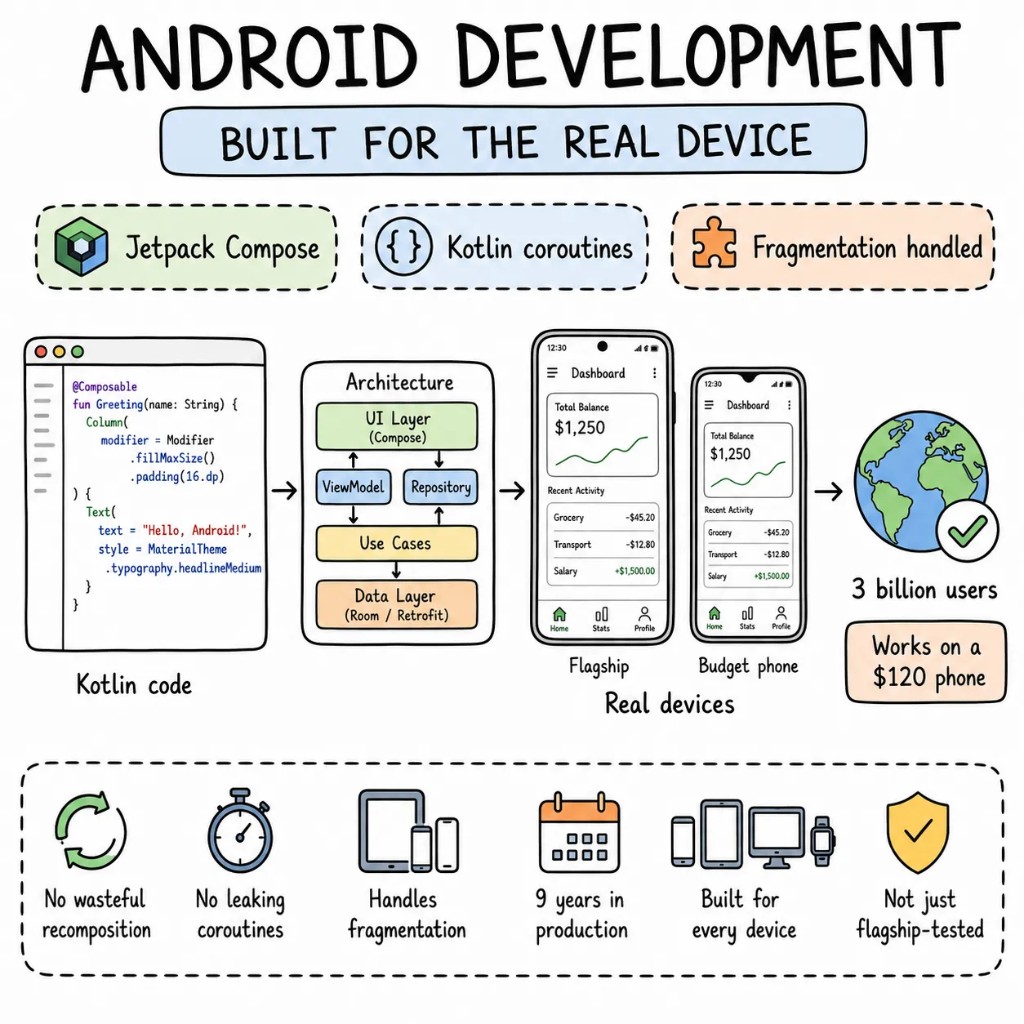
Android development, under the hood —Android development,under the hood —what Compose changes.Android development,under the hood —what Compose changes.what Compose changes.
Years of Android in production mean we've already hit the walls most teams discover at scale — ANR crashes nobody can reproduce, RecyclerView jank on budget hardware, Play Store rejections from a policy the app never considered. This page is about what's inside a modern Android app, and how a Java XML codebase moves to Kotlin Compose without stopping releases.
Four things every Android app development project actually needs.
Android is harder than iOS for one reason: fragmentation. The same app has to work on a mid-range Samsung, a Pixel tablet, and a two-year-old Xiaomi with half the RAM. Plenty of teams test on three devices and call it done. We test on the devices your users carry.
Performance01
60fps on a budget device, not just a Pixel.
We profile with Android Studio's CPU Profiler and Perfetto from the start, rather than after the Play Console starts reporting ANRs. Lists use DiffUtil and the ViewHolder pattern. Background work goes through WorkManager. A dropped frame on a mid-range phone reads as a one-star review.
Architecture02
Feature modules, not a monolithic app package.
Each feature in an Android development project lives in its own Gradle module with explicit dependencies. The app module wires them together — it doesn't own business logic. ViewModels survive configuration changes. Repositories own data, not Fragments. Two engineers work on two features without a merge conflict every afternoon.
State03
Kotlin Flow over LiveData where it earns the switch.
LiveData lives where it belongs — UI observation. Flow handles everything else: API calls, database streams, background work coordination. StateFlow for UI state that survives recomposition. SharedFlow for one-shot events. Each one chosen for the job rather than carried over from a tutorial.
Type safety04
Kotlin's type system used fully, not avoided.
Data classes for every API response, sealed interfaces for domain state, Result types for expected failures. Kotlin Coroutines handle concurrency without the callback hell that made Java Android development infamous. When a backend field changes, the Kotlin compiler finds every broken callsite before QA runs.
When Android native, when not
Android native development is a tool. Not always the answer.
Native Kotlin gives you the deepest access to the Android platform. It also costs more: two codebases, two sets of engineers, two store submission processes. On the first call we'll tell you whether native is justified or whether cross-platform gets you the same result faster.
GO NATIVE ANDROID WHEN
Deep hardware integration — NFC, Bluetooth LE, camera2 API, custom USB peripherals — where a cross-platform abstraction layer adds latency or drops capability you can't afford to lose
The app targets specific Android OEM features — Samsung DeX, Xiaomi MIUI widgets, Android Auto — that React Native can't reach
Performance-critical surfaces where Compose's direct GPU access matters more than cross-platform parity
Enterprise deployment through MDM or Android Enterprise with per-device provisioning policies the IT team requires
CONSIDER CROSS-PLATFORM WHEN
iOS and Android need to ship together and the budget doesn't support two separate native teams
The core product is content-driven — lists, forms, detail screens, navigation — functionality React Native or Flutter handles cleanly on both platforms
Time to market is the priority right now; you can extract native modules for specific surfaces once you know what needs them
WE SAY NO WHEN
"Native is always better." That's a preference, not a requirement, and we won't take the work if cross-platform fits better.
"Wrap our website in a WebView and submit it to Google Play." Google will flag it, and they should.
"Two weeks to launch, features still being defined." Define the features first. Then we can talk about weeks.
What we build for Android
Six Android app development surfaces. One quality bar.
The kinds of Android work we do most often, each built to pass Play Store review on the first submission and hold up on the phones your users carry.
S01
Consumer Android apps
Consumer Android apps
Full consumer Android app development stack: onboarding that converts, Google Play Billing for subscriptions with server-side validation, Firebase Cloud Messaging for push, App Widgets for the home screen, and Play Store listing assets that pass the policy review.
KOTLINJETPACK COMPOSEFIREBASEPLAY BILLING
S02
Enterprise Android apps
Enterprise Android apps
Android Enterprise provisioning, MDM compatibility, certificate pinning, biometric authentication through BiometricPrompt, offline-first sync for teams working without reliable connectivity. Built for regulated environments where security is a requirement rather than a feature.
KOTLINANDROID ENTERPRISEBIOMETRICWORKMANAGER
S03
Jetpack Compose migrations
Jetpack Compose migrations
XML View-based apps migrated to Jetpack Compose — screen by screen, never a flag-day. The app stays on Google Play throughout. Each migration step behind a feature flag with its own rollback path.
JETPACK COMPOSEKOTLINMATERIAL 3NAVIGATION
S04
Wearable OS companion apps
Wearable OS companion apps
Wear OS apps that share a Kotlin codebase with the phone app through shared modules. Health Sensors API, background health tracking, tile and complication providers — Android development that reaches the wrist.
WEAR OSHEALTH SERVICESCOMPOSE FOR WEARDATALAYER
S05
Internal field apps
Internal field apps
Replace the spreadsheet your Android field team photographs and emails every afternoon — barcode scanning with ML Kit, offline form submissions synced when connectivity returns, GPS tracking with FusedLocationProvider. Tested on the same budget phones your warehouse team uses.
KOTLINML KITROOMMAPBOX
S06
Java XML to Kotlin Compose migrations
Java XML to Kotlin Compose migrations
Java Android apps still running Android Support Library get migrated to Kotlin and Jetpack — one module at a time, interoperability maintained throughout. The technical debt that slows every new feature gets resolved without stopping product delivery.
KOTLINJETPACK COMPOSEMATERIAL 3HILT
The playbook
Android development patterns we ship on repeat.
The patterns we use on production Android apps, tested on real devices rather than only Pixel emulators.
PP01
Compose-first, XML where it earns its place.
New screens go in Jetpack Compose with Material 3. XML Views stay for components Compose doesn't handle as cleanly yet — custom SurfaceView rendering, specific RecyclerView animations. We don't mix the two without a reason.
PP02
Coroutines everywhere.
Kotlin Coroutines replace every AsyncTask, Handler, and thread pool that made Java Android development hard to read. ViewModelScope for UI work, IO Dispatcher for network and database, structured concurrency for parallel work that cancels cleanly when the ViewModel clears.
PP03
Hilt dependency injection from day one.
Constructor injection for every ViewModel, Repository, and UseCase. No Singleton objects that make tests impossible. No manual dependency graphs that break when a class gets a new constructor parameter. Hilt catches misconfiguration at compile time.
PP04
Design tokens via Material 3 theme.
Colour, typography, and spacing defined once in a MaterialTheme, not hardcoded across two hundred composables. Dynamic Colour for Android 12+ where the system palette applies automatically. Dark mode, large text, and high contrast fall out of one token definition.
PP05
Espresso plus screenshot tests on critical paths.
Espresso covers the flows where a regression costs money — login, purchase, deep link. Paparazzi captures composable screenshots for visual regression. Both run in CI on every PR without a physical device being plugged in.
PP06
Incremental Compose adoption.
ComposeView embeds Compose screens inside Fragment-based navigation. AndroidView embeds legacy XML where Compose hasn't caught up yet. The migration is gradual, the app ships continuously, and no quarter gets frozen to pay for a rewrite.
Engagement shape
Eight to ten weeks to a measurable ship.
A typical Android engagement, end to end. Screen by screen, with the current app on Google Play the whole time.
W01
Audit + RFC
Two senior Android developers go through the codebase — CPU profiling to find the real ANR candidates, a Fragment complexity inventory, a WorkManager audit for silent background failures, and a Play Store policy check. The output is a ranked RFC with effort estimates.
W02–03
Foundation + first screen
Kotlin and Compose baseline, Hilt wiring, ViewModel boundaries established, one production screen built end-to-end and pushed to the internal testing track. Performance numbers come from a physical mid-range Android phone, not a Pixel emulator.
W04–08
Build screen by screen
Feature by feature under feature flags, Java XML and Kotlin Compose coexisting. Each cutover has a rollback path. Your product team keeps shipping new features in parallel — the Android development migration never becomes a reason to freeze the roadmap.
W09+
Play Store submission + handoff
Store listing assets, content rating questionnaire, data safety form, policy compliance check, first submission to production track. Google Play review typically runs 1–3 business days. Runbook handed to your team — or we stay on retainer.
Verified feedback from Upwork, Clutch, and reference calls we're happy to set up before you sign anything.
Evan Kanouse
CEO, Modestly
Entalogics has successfully delivered extension prototypes on time, and we are impressed with their project management and the finished product. The client communicates with Entalogics via virtual meetings, email, and messaging apps.
Adam Strock
Founder, Flourish Schools
Collaborating with Entalogics was a great experience. Communication was clear, we aligned quickly, and their team delivered high-quality code on time with thoughtful technical decisions.
Giles Whitman
CTO, SentryBay
Their Chromium expertise helped us ship a hardened browser with live threat controls and enterprise rollout support. Security operations became significantly faster.
George Irvin
Founder, G3 Ventures LLC
Entalogics delivered our custom Electron browser in six months with isolated profile workflows and stable policy sync. Agent onboarding improved by 55% after rollout.
Dani Keo
Project Manager, Sociall
Entalogics built our iOS Chromium-based mobile app with a smooth native feel, stable media rendering, and reliable sync. We shipped faster and improved engagement after launch.
Project Manager
RozmeriGPT
The web dashboard and Chrome extension now share prompts, billing, and analytics in one platform. Our content turnaround improved 4x after launch.
IIYA KHODAKOVSKY
Project Manager, Omni Browser
Entalogics built our Omni Browser on top of Chromium with deep product-level execution. They implemented an integrated VPN and Omni Crypto Wallet directly in the browser, made strong architectural decisions, and delivered quality code on schedule with clear communication.
Sherzod Khabibullayev
Project Manager, Digital Office: Aura
Entalogics built Digital Office: Aura as a custom Chromium-based authentication platform. Their team modified Chromium internals and integrated our manual custom authentication flow with reliable implementation, fast delivery, and consistent communication.
Engagement
Three ways to work with us on Android development.
No hourly billing. Each option is a fixed quote or a rate you see before you commit.
FIXED SCOPEone-off build
Ship an Android app, end-to-end.
One product, one fixed price, built entirely by senior Android developers with no junior rotation. RFC to Google Play submission in 8–14 weeks.
Compose or XML, native or React Native, device fragmentation. The questions that come up on most Android calls.
New Android apps start in Jetpack Compose — Google has made it the default for new development, Material 3 works best there, and it's significantly faster to build with once the team is past the learning curve. XML Views stay in the picture for existing codebases where a full rewrite isn't justified, and for specific components Compose doesn't handle cleanly yet. We migrate existing apps incrementally, each screen behind a flag, the app shipping throughout.
Real device testing on mid-range hardware — a Samsung Galaxy A-series, a Xiaomi device, and a Pixel, rather than an emulator on a fast Mac. Firebase Test Lab covers the wider device matrix in CI. Responsive layouts with WindowSizeClass adapt from 5-inch phones to 12-inch tablets. We target Android 8 (API 26) by default, which covers the vast majority of active devices, and go lower only for a specific business reason.
Yes. This is what most Android migrations look like. Kotlin interoperates with Java in the same codebase, ComposeView embeds Compose screens inside Fragment-based navigation, and the app ships new features throughout the migration. Most Java-to-Kotlin Compose migrations on a typical codebase run 10–14 weeks. We scope it after the audit.
Baseline Profiles tell ART which code paths to pre-compile at install, so the first cold start doesn't interpret the hot path — on a mid-range device that's routinely the difference between a two-second launch and a four-second one. R8 in full mode shrinks and inlines the release build; combined with a profile generated from a real startup journey, it's the cheapest startup win most Android apps never ship. Both are build configuration, not feature work.
Yes, including your dependency injection framework, your navigation library, and your CI setup. If something structural is going to create a real problem during the engagement, we flag it in the RFC with a specific recommendation. If what's there works, we build on top of it.
Senior engineers
Tell us whatyou're building.
Thirty minutes with a senior engineer and a senior Android developer, and a straight answer on whether native Kotlin or cross-platform gets you there faster.