
OCTOBER 5, 2026
Chromium Now Ships Every Two Weeks. Is Your Browser Keeping Up?
Chrome and Chromium now ship a new stable milestone every two weeks instead of every four. Here's what changed, why it matters for security, and what teams that run or build Chromium-based browsers need to do about it.

By Umar Abdullah · Chromium & Browser Development
Short answer: Chrome and Chromium now ship a new stable milestone every two weeks instead of every four, starting with Chrome 153 on September 8, 2026. If you just run Chrome or Edge, auto-update absorbs most of it. If you ship your own Chromium-based browser, you now have about twice as many upstream milestones to take each year, and a fork without an update process falls behind on security within months.
What actually changed in Chromium's release cycle?
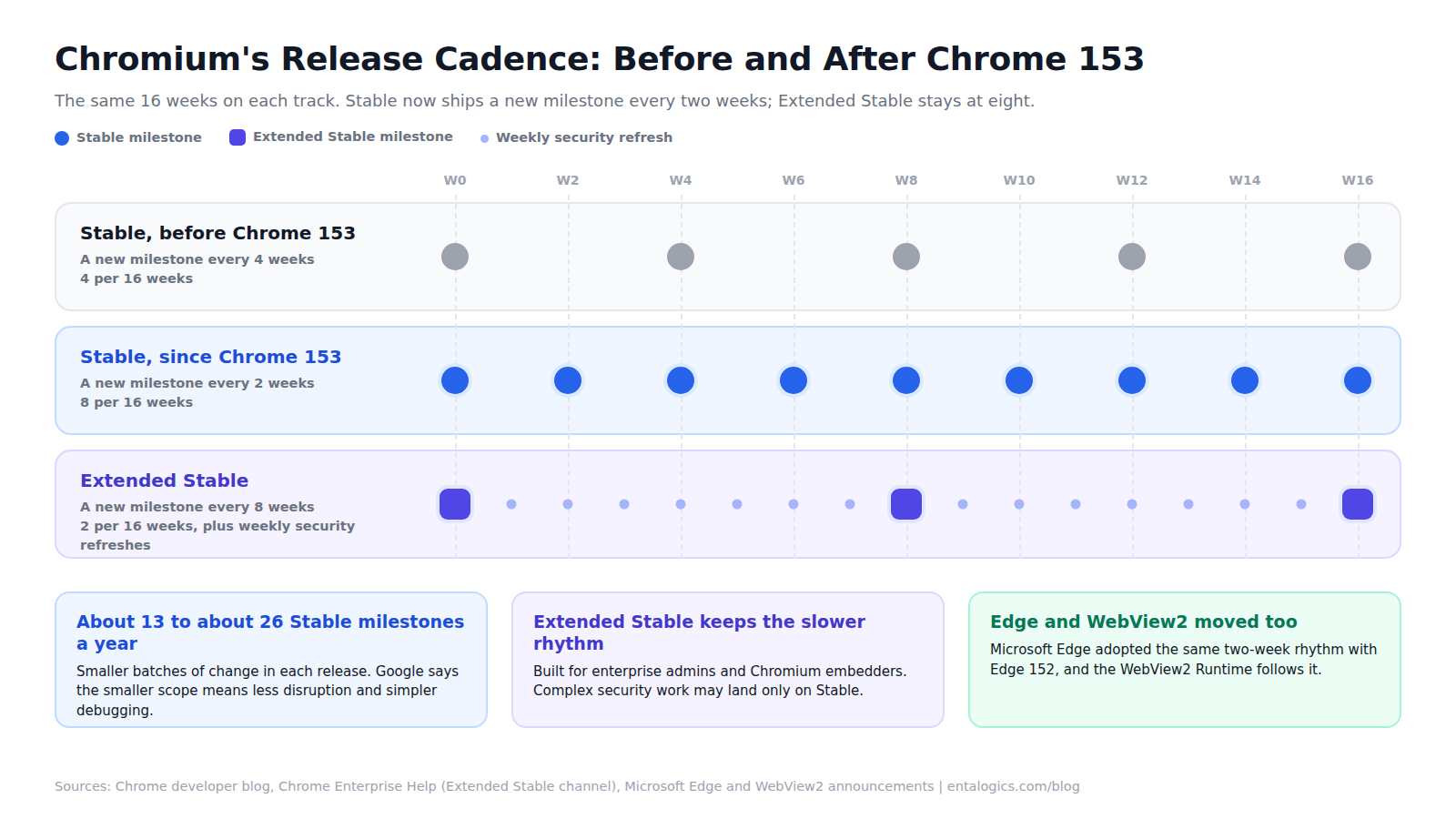
Starting with Chrome 153 on September 8, 2026, Chrome ships a new beta and a new stable version every two weeks. Before that, a new stable milestone arrived every four weeks. The change covers desktop, Android and iOS.
Chromium, the open-source project underneath Chrome, follows the same milestones, so everything built on it inherits the new rhythm. Microsoft Edge adopted the two-week cycle starting with Edge 152 in late August, and the WebView2 Runtime that ships with Edge moves with it. Any custom browser, desktop app or embedded browser that tracks upstream Chromium is now on a faster clock too, whether or not its owners noticed.
Not everything moved. Extended Stable, the slower channel Google introduced in 2021 for enterprise administrators and Chromium embedders, keeps its eight-week cycle. Edge keeps an eight-week Extended Stable option as well, for managed environments.
| Track | New milestone every | What you get | What you give up |
|---|---|---|---|
| Stable | 2 weeks (was 4) | The newest features and fixes, soonest | More validation work, twice as often |
| Extended Stable | 8 weeks | More time per update, with important security fixes back-ported and refreshed weekly | Complex security work and large features may land only on Stable |
Why did Google speed it up?
Google's stated reason is that users and developers get performance work, fixes and new capabilities sooner, and that smaller releases are less disruptive and easier to debug after they ship.
Microsoft was more specific when it made the same move for Edge. Critical Chromium patches reach users up to two weeks sooner. WebView2 stays on the same schedule as the Edge runtime it's built on, so the two can't drift apart. And each update carries a smaller set of changes, which makes validation more manageable.
The security logic is simple. Chromium is open source, so a fix is visible in the public repository before every user has it. The shorter the gap between a fix landing and a stable build that contains it, the less time anyone has to study that patch and write an exploit for people who haven't updated yet.
Security fixes never waited for a new milestone, though. Extended Stable, for example, still gets weekly security refreshes. So the two-week cycle is less about the patch itself and more about how quickly everything else arrives, along with the work of absorbing it.
That's the catch. Smaller batches of change are easier to reason about, but the total amount of change doesn't shrink. It arrives in more, smaller pieces, and the fixed cost of handling each piece (build, test, sign, roll out) doesn't shrink with it.
What does it mean if your organization just runs Chrome or Edge?
Mostly, nothing breaks. Auto-update installs the new version. What changes is how often you need to check that your internal web apps, extensions and policies still behave.
You have two real options:
- Stay on Stable. Google recommends this if getting patches immediately matters more to you than keeping maintenance cost low.
- Move some or all of your fleet to Extended Stable. You get eight-week milestones with weekly security refreshes, and you accept that some complex security changes and large features may only be on Stable.
Either way, a few habits pay off:
- Keep a small pilot group on a faster ring, so you see breakage a couple of weeks before everyone else does.
- Pick the five internal web apps and extensions you can't afford to break, and test those on the pilot ring every milestone. Smaller releases make this quicker than it sounds.
- Check your patch policy. A rule like "browser updates within 30 days of release" used to span about one milestone. On a two-week cycle it spans two or more, so decide whether the number still means what you meant.
- Don't pin a version and forget about it. A pinned browser that nobody revisits is how a managed fleet ends up months behind on security.
What does it mean if you ship your own Chromium-based browser?
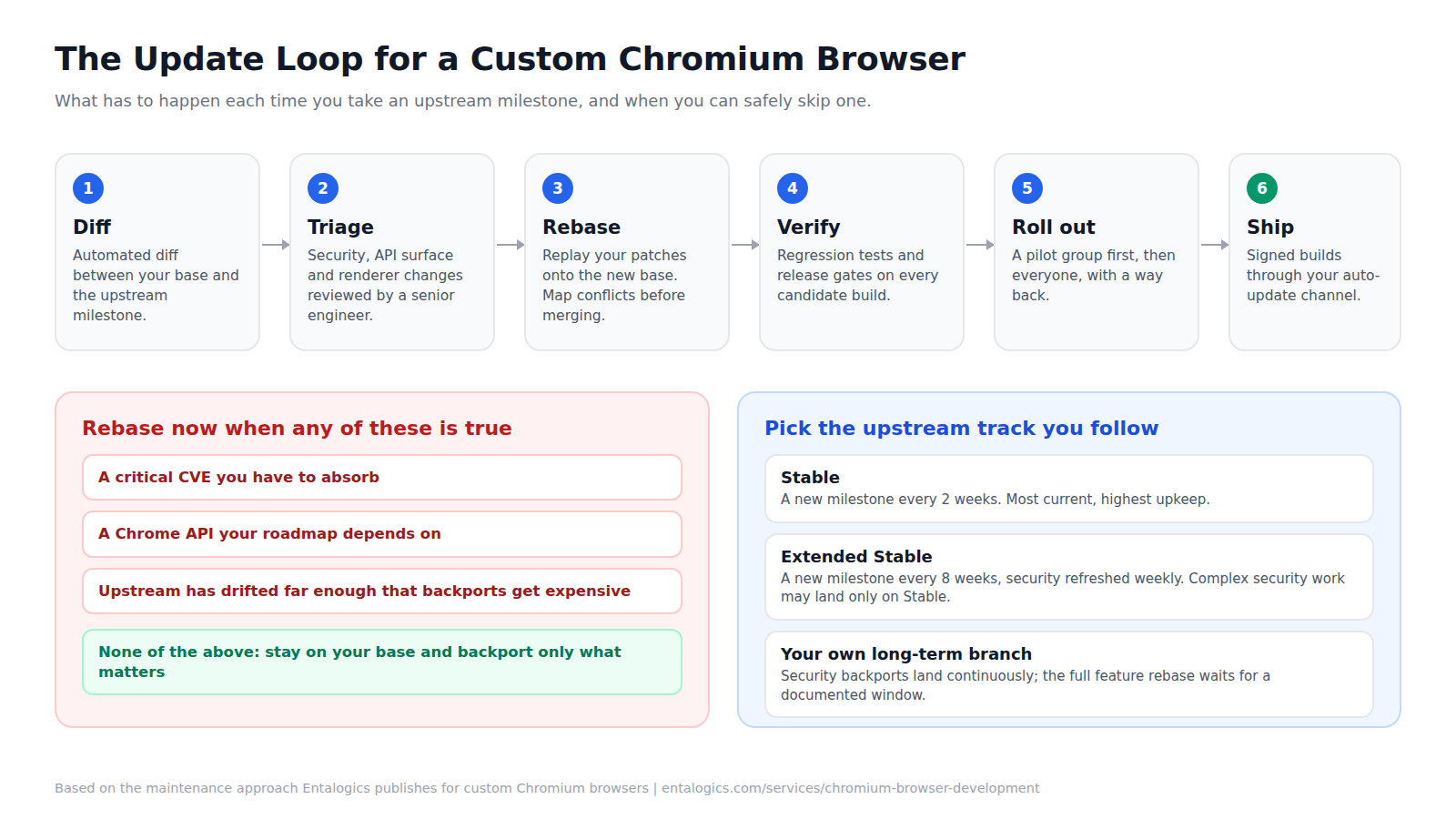
This is where the change bites. A team that used to take about 13 upstream milestones a year on Stable now faces about 26. Each one means the same cycle: diff the upstream changes, triage them, rebase your patches, regression-test, sign, ship.
There are three ways teams respond:
The failure mode is none of those. It's skipping milestones "until things calm down." They don't. Every milestone you skip adds divergence, and once upstream has drifted far enough that backports get expensive, teams stop updating at all.
What goes wrong when a Chromium fork falls behind?
Three things, in the order they tend to bite:
- Security. Every vulnerability fixed upstream since your base milestone is still open in your build, and the fixes are public. Our rule of thumb is that a fork with no upstream-sync plan falls behind on security within about six months.
- Web compatibility. Sites and web apps are built and tested against current Chrome. An old engine meets new platform features late, or never.
- Rebase cost. Each skipped milestone makes the next rebase bigger. Past a point the update stops being a routine and becomes a project, and projects get postponed.
Ship faster with senior engineers
Direct collaboration, AI-augmented delivery, and no agency markup.
Get in touchWhat does a sustainable update process look like?
It looks like the loop in the diagram above, run on every milestone you track:
Then there's the question of when you can skip a milestone safely. Three triggers force a rebase: a critical CVE you have to absorb, a Chrome API your roadmap depends on, or upstream divergence wide enough to make backports expensive. If none of those is true, stay on your base and backport only what matters.
Two habits keep the whole thing cheap. Keep your patch set small and documented, so every patch has an owner and a reason to exist. And keep CI building against a newer upstream branch than the one you ship, so you see conflicts before the milestone becomes your problem.
Should you follow Stable, Extended Stable, or run your own branch?
It depends on what a missed fix costs you:
- A single missed exploit is a business problem (consumer-facing browsers, privacy and account-isolation browsers, wallets, security tooling): follow Stable, or run a long-term branch with continuous security backports.
- A managed enterprise browser with a heavy validation burden (regulated environments, lots of internal apps): an Extended Stable base or your own long-term branch, with documented rebase windows.
- A small team with no dedicated Chromium engineers: think hard before forking at all. A browser extension or an embedded WebView may do the job without you owning an engine.
Extended Stable isn't a free pass. It buys time, and Google is clear that complex security changes and large features may only be available on Stable.
If you build on a framework instead of forking, the new cadence reaches you through the framework. WebView2 now follows Edge's two-week rhythm, and Microsoft describes that as a release-timing change only, with no API changes. Electron sets its own schedule on top of Chromium's (historically a major release roughly every eight weeks, with the latest three majors supported), so check its current schedule against Chromium's before you assume your update plan still fits. We covered the security side in Electron 44: Where the Real 2026 Vulnerabilities Are.
Three questions to ask about your browser this week
If nobody can answer all three in a minute, that's your audit.
How does Entalogics handle this?
Our Chromium browser development service includes upstream sync and maintenance as a retainer. We own your milestone rebases, security backports and signed release builds on the channel you track, Stable or Extended Stable, so your browser doesn't fall behind. The process is the loop above: an automated upstream diff on every milestone, a senior engineer triaging security, API-surface and renderer changes, conflicts mapped before merge, and regression testing and release gates before anything ships.
If your Chromium-based browser is more than a milestone or two behind, talk to us about Chromium browser development or hire Chromium browser developers. You can also read how we approach Chromium development more broadly.
Sources: Google's Chrome developer blog posts on the two-week release cycle (announcement and launch post); the Extended Stable channel page in Chrome Enterprise and Education Help; Microsoft's WebView2 two-week cadence announcement and the Microsoft Edge release schedule.