
OCTOBER 2, 2026
You Don't Need to Rebuild the Platform — You Need the Right Browser Extension
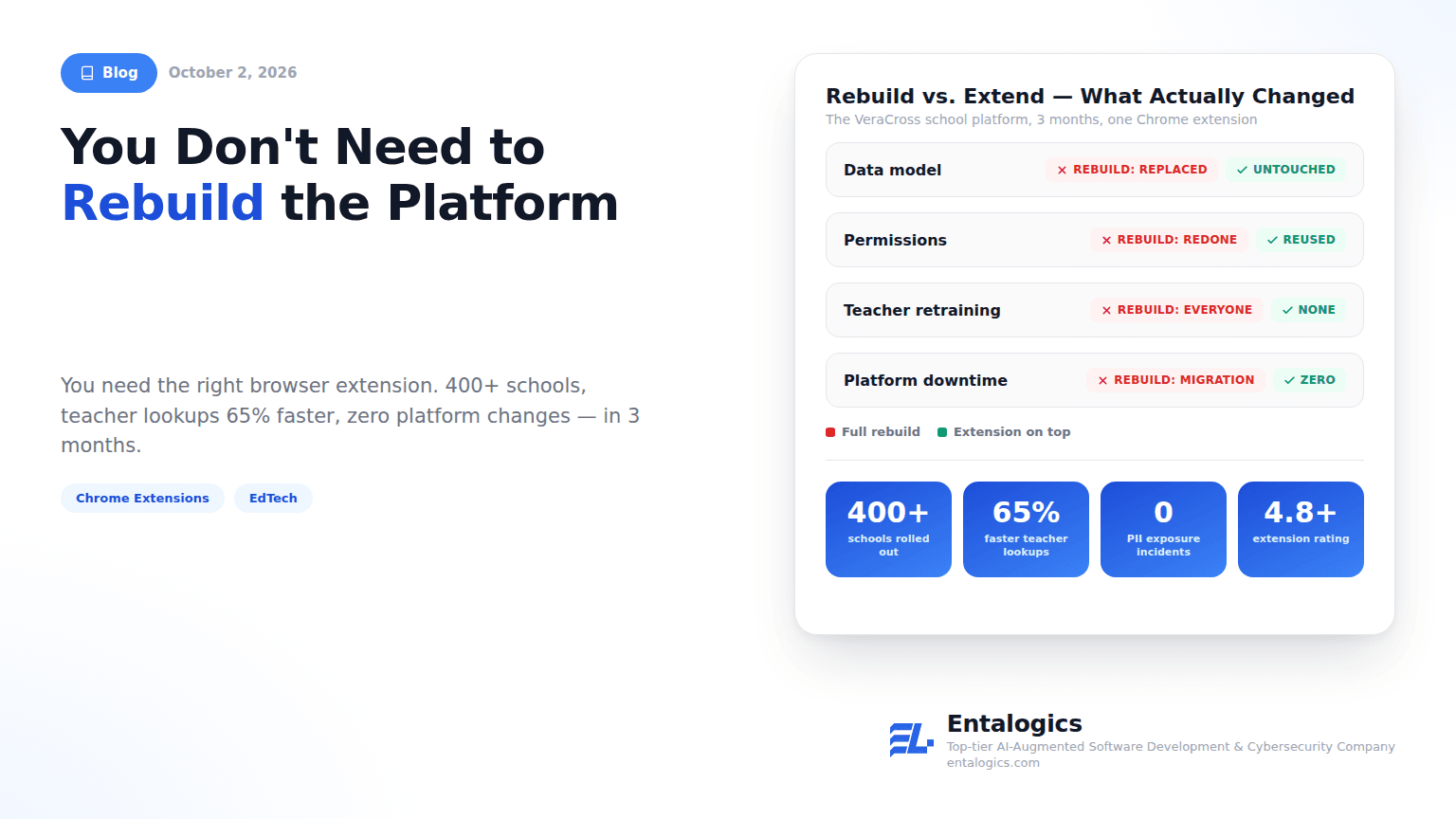
VeraCross already had a working school platform in hundreds of US schools. The problem wasn't the platform — it was the friction of using it all day. A Chrome extension fixed that in 3 months without touching the existing system: 400+ schools, teacher lookups 65% faster, zero PII incidents.

By Umar Abdullah · Chromium & Browser Development
The most expensive sentence in software is "we should just rebuild it." Sometimes it's right. More often it's a reaction to friction that lives somewhere much smaller — in the four clicks between a teacher and a student's attendance record — and a rebuild replaces the one thing that actually works, the system underneath, to fix the one thing that doesn't.
VeraCross is the cleanest example of this we've shipped. Their school management platform was already live across hundreds of US schools. The data model worked. The permission system worked. What didn't work was the daily experience: looking up a student, checking attendance, or pulling a class roster meant navigating through multiple pages and menus, every time, for people managing a classroom in real time. That friction adds up by second period, and it's the kind of friction that quietly turns into "the system is bad" in staff meetings — even when the system is fine.
This post is about how to tell the difference, what we built when the answer was "extend, don't rebuild," and the parts of that build that were genuinely hard.
The decision in one table
| Full rebuild | Browser extension on top | |
|---|---|---|
| Data model | Replaced, with a migration | Untouched |
| Permissions | Rebuilt from scratch | Reused as-is — same role-based rules |
| Who has to retrain | Everyone, on everything | Nobody — the platform doesn't change |
| Where the fix lives | A new system | The browser toolbar, where the work already happens |
| Time to value | Measured in migrations | 3 months, for VeraCross |
| Risk if it goes wrong | The whole platform | One extension you can unpublish |
Rebuilding the platform would have solved a problem VeraCross didn't have. So we built a Chrome extension that sits on top of it instead.
The three questions that decide it
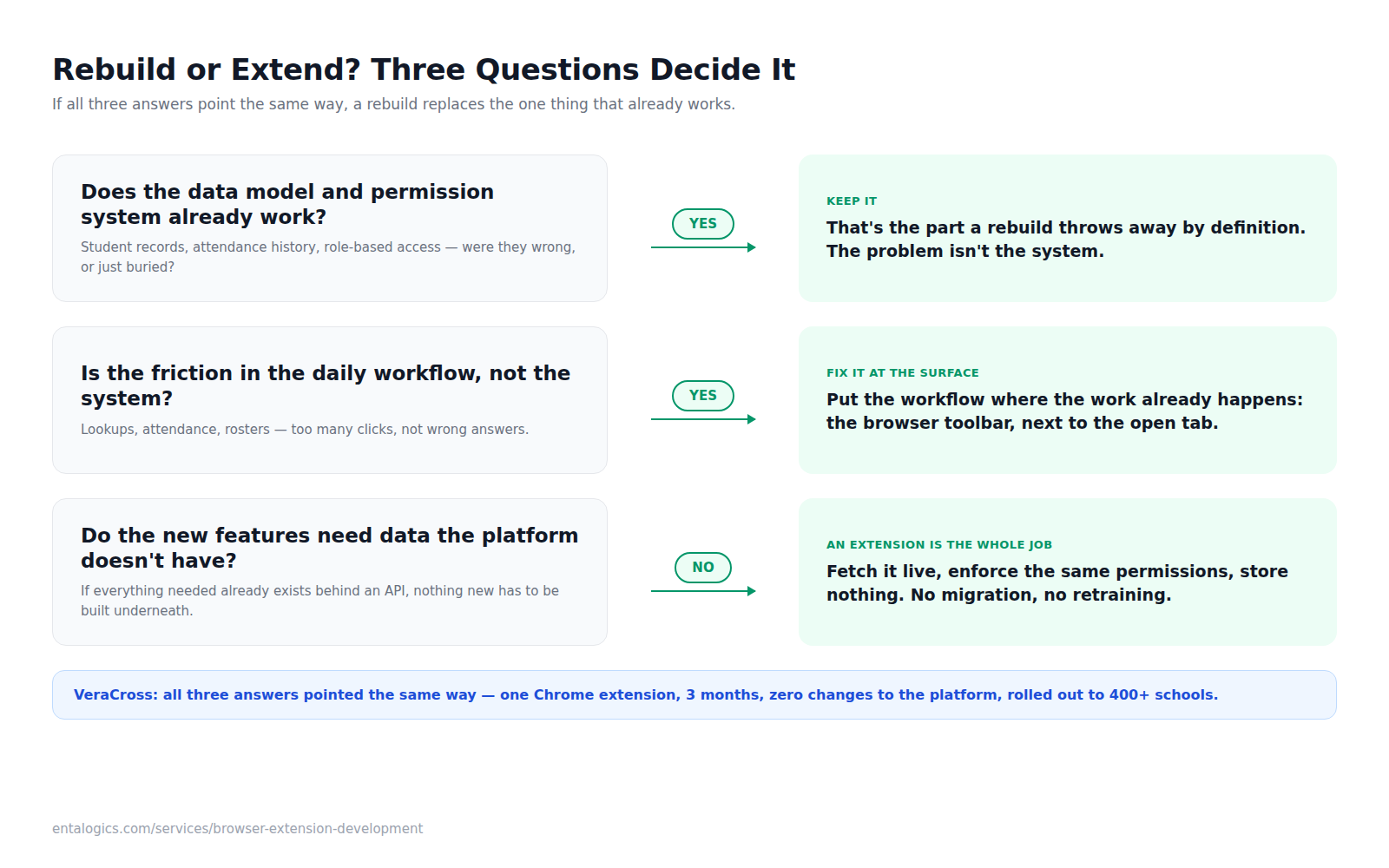
Does the data model and permission system already work? If yes, that's the part you must not touch. A rebuild throws it away by definition — and with it, every edge case the current system has already absorbed over years of real use. For VeraCross, the student records, attendance history, and role-based access control were exactly right. They were just buried. The way to check this honestly: ask whether anyone is complaining that the answers are wrong, or only that they take too long to reach. Those are different problems with different price tags.
Is the friction in the daily workflow, not the system? Teachers weren't saying attendance was inaccurate. They were saying marking it took too long. That's a surface problem, and surface problems are solved at the surface. The practical test is to count clicks: pick the five tasks people do most often in a day and walk through each one in the current product. If the task is "find a student" and the honest count is six clicks across three screens, the system isn't broken — the path to it is. A browser extension lives in the toolbar, next to whatever tab a teacher already has open, which is where the work was actually happening.
Do the new features need data the platform doesn't have? If they do, you're building a new system whether you call it that or not — and an extension would just be a thin, fragile front on top of a backend that doesn't exist yet. If they don't — if everything the user needs already exists behind an API — an extension that fetches it live is the whole job. Every feature on VeraCross's list passed this test: student profiles, attendance, rosters, schedules, and messaging were all already there, in the existing database, behind existing permissions.
When all three point the same way, a rebuild isn't the ambitious option. It's the expensive way to arrive at the same place later.
What "a browser extension" actually means here
It's worth being concrete, because "extension" gets used loosely. A Chrome extension in this sense is three things working together:
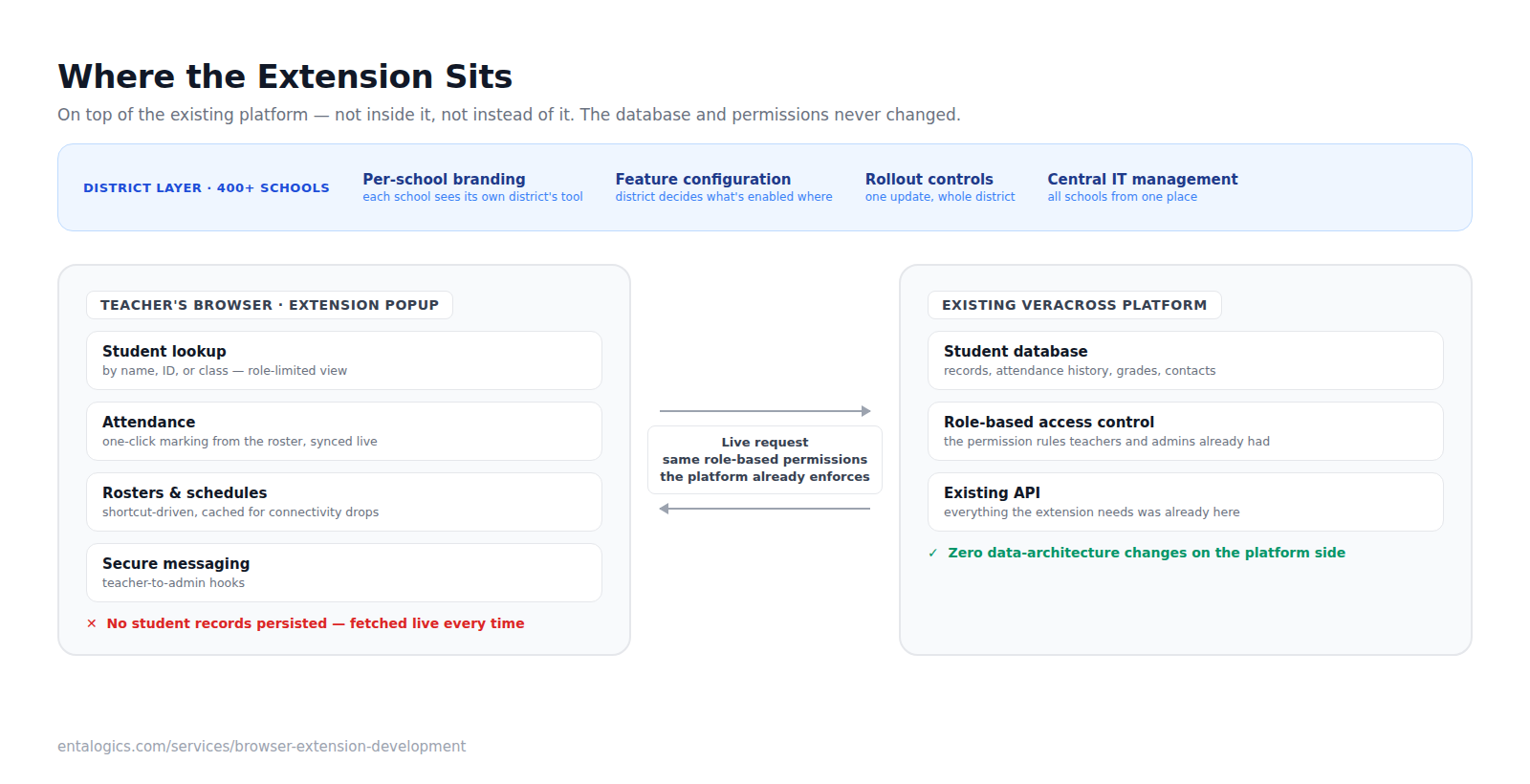
- A toolbar popup — the UI a teacher clicks. For VeraCross this is the search box, the roster, the attendance controls. It opens over whatever page is already loaded, so nobody leaves what they were doing.
- A background service worker — the piece that talks to the platform's API, holds the session, and does the fetching and syncing. In the current Chrome extension model (Manifest V3) this runs only when needed and is shut down when idle, which is a constraint you design around rather than fight: the extension can't assume anything stays resident, which happens to line up well with "store nothing you don't have to."
- Optional content scripts — small pieces that can read or annotate the page the user is on. We use these sparingly; the less an extension reaches into a page it doesn't own, the less there is to break when that page changes.
What it is not is a copy of the platform. It has no database of its own. Every meaningful action is a request to the existing VeraCross API, made as the signed-in user, which means the platform's own authorization decides what comes back. The extension never has to re-implement a single permission rule — and that, more than any feature, is why this approach is safe in a regulated environment.
What we built on top of VeraCross
3 months. Chrome Extensions, TypeScript, React, Firebase.
- Student lookup from the toolbar. Search by name, ID, or class; the profile — attendance record, grades, contact information — appears in the extension popup. Each user sees only what their role permits, because the extension enforces the platform's existing permission rules rather than inventing its own. A teacher and a district administrator run the same search and get different results, exactly as they would inside the platform.
- Attendance without the full platform. Mark and review attendance from a class roster view with one-click marking, synced in real time to the existing VeraCross database. Per-student attendance history is one click away. This was the single highest-frequency task in a teacher's day, which is why it got the most design attention — a workflow you do five times before lunch has to be nearly instant or it isn't an improvement.
- Teacher workflow shortcuts. Class schedules, rosters, and student notes behind keyboard-driven shortcuts, plus secure messaging hooks for teacher-to-admin communication. The shortcuts matter more than they sound: the whole premise is removing navigation, and a keystroke removes more of it than a well-placed button.
- District-level controls. District branding applied per school, district-level configuration of which features are enabled where, centralized management for IT administrators across multiple schools, and rollout controls for pushing updates to an entire district at once.
The extension connects directly to VeraCross's existing database and respects the role-based permission system already in place. No data architecture changes were needed on the platform side. That sentence is the entire argument for this approach — the platform team's roadmap didn't have to stop for us, and nothing we shipped created a second source of truth they'd have to keep in sync.
Ship faster with senior engineers
Direct collaboration, AI-augmented delivery, and no agency markup.
Get in touchThe part that's actually hard
An extension that touches student data in US schools has two requirements that pull against each other: it has to be fast and usable when the Wi-Fi drops mid-lesson, and it must not become a second copy of the student database sitting in a browser profile.
We resolved it by being strict about what the extension is allowed to remember. Student records are fetched live from VeraCross in real time and are never persisted by the extension — there is no student dataset to leak, because there is no student dataset. A limited cache of core working data keeps the day moving through a connectivity drop. Everything sensitive is a live request, authorized by the same role-based rules the platform already enforces, so the extension can't show a user anything the platform wouldn't. In a US school context that's what "compliant with student data privacy requirements" has to mean in practice: not a policy document, but an architecture where the risky thing is structurally impossible.
The second trap, which we see teams fall into constantly, is re-implementing business logic in the extension "for speed." The moment the extension decides on its own who can see what, or caches a computed result the platform owns, you have two systems that can disagree — and the one in the browser will drift first. The rule we held to: the extension renders and the platform decides. If a fast path needed a rule, the rule stayed on the platform side and the extension called it.
The third hard part was scale. One school is a demo; 400 schools is an operations problem. District-level branding and configuration meant each school could look like its own district's tool while IT managed all of them from one place, and rollout controls meant an update went out district-wide in one motion instead of 400 individual installs. Without that layer, every feature flag becomes a support ticket.
When an extension is the wrong answer
Being honest about the limits is the only way the framework stays useful:
- When the data model is the problem. If the complaints are about wrong, missing, or inconsistent data, an extension will only make the wrong answers arrive faster. Fix the system.
- When the work doesn't happen in a browser. Field staff on phones, kiosks, offline-first environments — an extension assumes a desktop browser is already open with the user signed in. Schools fit that assumption well; a delivery fleet doesn't.
- When there's no API, or you don't control the platform. If the only way in is scraping pages you don't own, every upstream UI change is a breakage. VeraCross worked because VeraCross owned both sides: their platform, their API, their extension.
- When the browser isn't standardized. An extension is a per-browser artifact. It's a strong fit where the user base is already on one browser — which is common in schools and in managed enterprise environments — and a weak fit where every user brings their own.
- When the feature needs to exist for people who aren't logged in. Extensions act as the signed-in user. Public-facing surfaces are a different build.
If two or more of these apply, the extension is a stopgap, not a solution — and it's better to say so at scoping than to discover it at rollout.
How to scope one in a week
This is roughly the exercise we ran with VeraCross, and it's the one we'd run with anyone considering the same move:
A week of this produces a scope that's honest about what the extension will and won't do, and it usually produces a shorter list than anyone expected — which is the point. The extension's job is to remove friction from the work people already do, not to grow a second product.
Where it landed
Rolled out to 400+ schools. Teacher lookup time cut by 65%. Zero PII exposure incidents post-launch. Extension ratings above 4.8 stars from the people using it every day. Daily tasks that used to mean navigating the full platform now take one click from the toolbar, and the platform itself never changed.
VeraCross is a good example of solving the right problem. The system didn't need to be rebuilt — it needed to be made faster for the people who live in it. A well-scoped extension delivered that without touching the existing platform, in a quarter, and the rebuild conversation never had to happen.
If you have a platform that works but is slow to use, talk to us about browser extension development, hire Chrome extension developers for a scoped build, or read the full VeraCross case study. For the wider vertical, see how we approach EdTech software development.