
SEPTEMBER 12, 2026
Android 16: What the Missed Deadline Actually Blocks
Google Play's August 31, 2026 target API deadline already passed. If your app still targets Android 15 or lower, updates are blocked for new users on newer devices — here's what Android 16 actually requires, and what a compliance pass involves.

By Umar Abdullah · Mobile Development
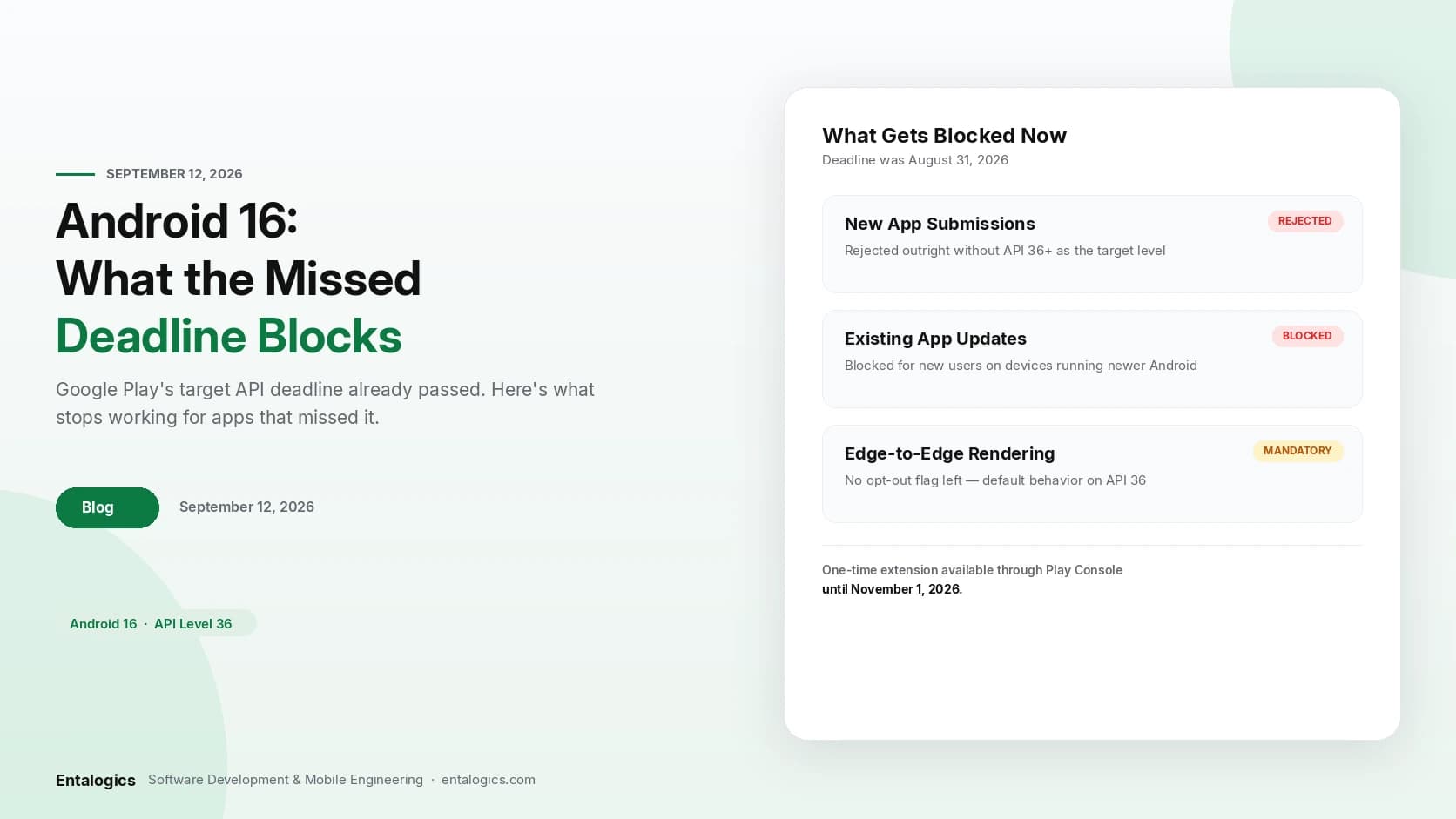
Short answer: Google Play's target API level deadline for Android 16 (API 36) was August 31, 2026. It has already passed. If your app still targets API 35 or lower, Google Play blocks updates to it for new users on devices running newer Android versions — existing installs keep working, but you can't ship a fix or a feature to new users until you raise the target level. There's a one-time extension to November 1, 2026 available through Play Console, but that's the last date, not a new deadline to plan around. Raising the target level isn't just a manifest change — Android 16 makes edge-to-edge rendering mandatory and changes how back navigation works, so the update that gets you compliant is bigger than a version number.
What actually happens if you miss it
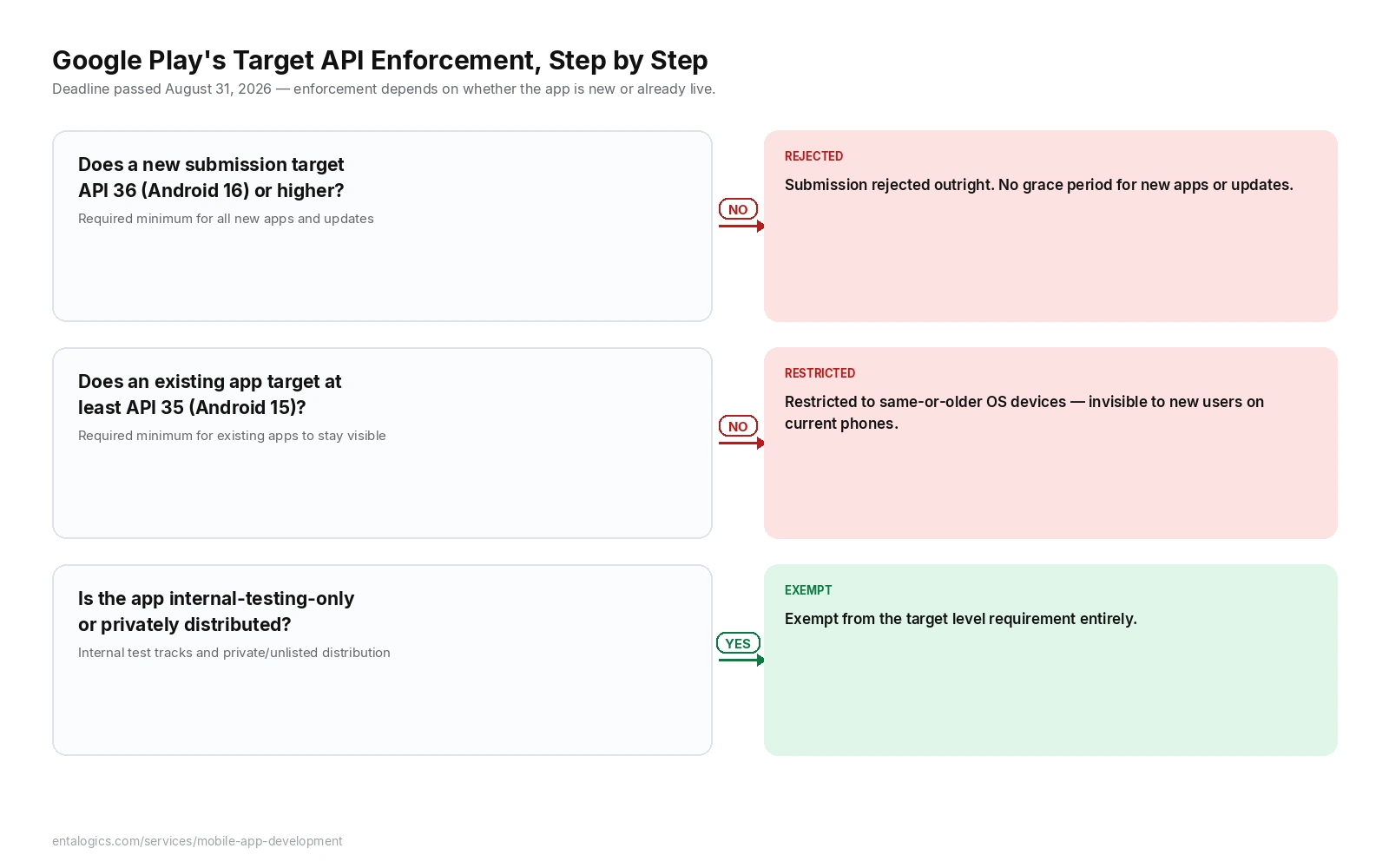
Google Play enforces this in two tiers, and which one applies depends on whether the app is new or already live.
New apps and app updates need to target Android 16 (API level 36) or higher to be published at all, as of the deadline. There's no grace period for a brand-new submission — it either targets API 36+, or Google Play rejects it.
Existing apps already on Google Play need to target at least Android 15 (API level 35) to remain available to new users on devices running newer Android versions. Fall short of that, and the app isn't pulled from the store — it's restricted to devices running the same OS version or older. New users on current-generation phones simply won't see it as available. Existing users who already installed it keep their current version and keep receiving updates normally.
The one-time extension pushes the deadline to November 1, 2026, but it has to be requested through Play Console before the original deadline — it isn't automatic, and it isn't repeatable.
A few app types are exempt: apps distributed only to internal testers, and apps set to a private or unlisted distribution track, aren't subject to the target level requirement.
What raising the target level actually triggers
Bumping targetSdkVersion to 36 in build.gradle is one line. What that line turns on is the real work:
Edge-to-edge rendering is no longer optional. Apps targeting API 36 render behind the system status bar and navigation bar by default — there's no flag left to opt out. An app that never accounted for this shows real breakage: buttons hidden behind the gesture nav bar, a toolbar that overlaps the status bar, RecyclerView items that scroll under the bottom bar and become untappable. The fix is handling WindowInsets explicitly for every screen that has content near a screen edge, not a single global setting.
Predictive back needs the newer API. Android's predictive back gesture — the animated preview that shows what screen you're returning to mid-swipe — depends on OnBackPressedDispatcher. Apps still using the deprecated onBackPressed() override don't crash, but they don't get the predictive animation either, and Google has been tightening how much longer the old override path stays fully supported. This is worth migrating regardless of the deadline, since it's the direction Android's navigation model is heading.
Background execution gets checked harder. WorkManager jobs, AlarmManager schedules, and foreground services all run under stricter policies on API 36. Behavior that worked reliably on API 34 or 35 — a background sync firing exactly when scheduled, a foreground service surviving as long as expected — needs re-testing rather than assumed to carry over unchanged.
Runtime permission flows need a pass. Permission denial and re-request behavior has shifted release over release, and API 36 is no exception. Any custom permission-rationale UI or retry logic needs to be exercised against the new behavior, not just left as-is.
None of this is optional once the target level moves — these are exactly the behaviors Android changes by default when an app declares it's built for the current platform.
The dependency chain nobody budgets for
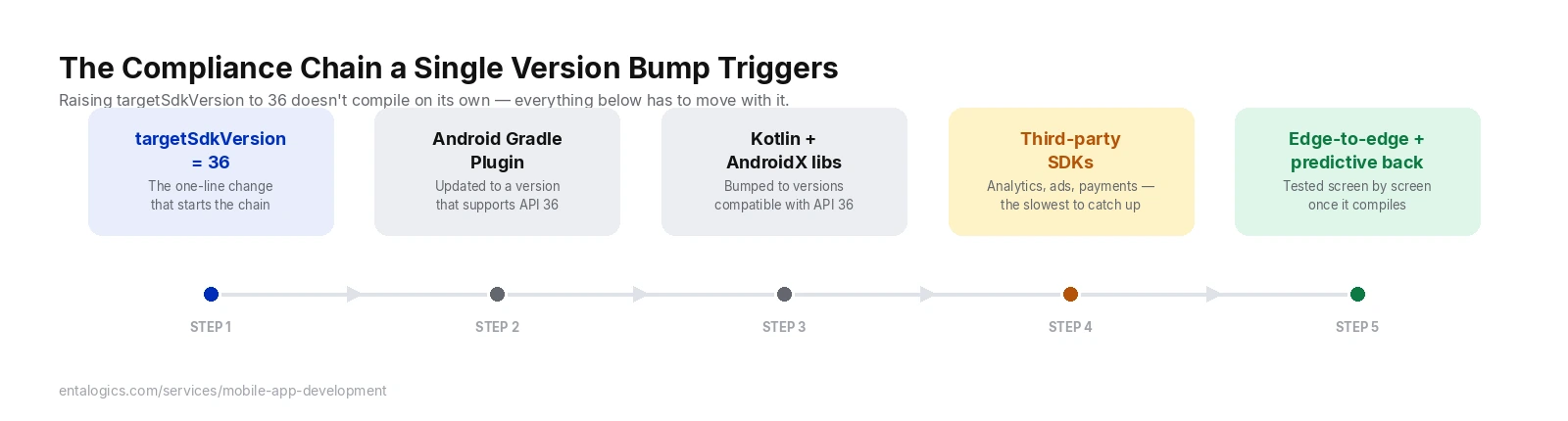
Raising targetSdkVersion alone doesn't compile cleanly on an old toolchain. Getting to API 36 in practice means updating the Android Gradle Plugin, Kotlin, the AndroidX libraries the app depends on, and — often the slowest part — any third-party SDKs (analytics, ads, payments, crash reporting) that haven't shipped their own API 36-compatible release yet. A team that's been putting off dependency updates for a year or two doesn't hit one wall here, they hit four or five in sequence, and the third-party SDK one is the one you can't fix by editing your own code.
Ship faster with senior engineers
Direct collaboration, AI-augmented delivery, and no agency markup.
Get in touchWhat this looks like on real builds
ShopEase, the native Android storefront we built for NovaCart Retail, and FitTrack, the Android fitness app we built for ActiveLife Wellness, were both built as native Kotlin apps on Android Studio before API 36 existed as a target — so neither one is "already compliant" just because it's well-built. What they do have going for them is a data layer that doesn't fight the migration: ShopEase's Room Database sits underneath its REST layer as the actual source of truth the UI reads from, and FitTrack treats the Google Fit API as its source of truth for raw activity rather than duplicating that logic. Neither of those decisions has anything to do with edge-to-edge insets or predictive back — they're just clean separation between data and UI. That separation is exactly what makes an edge-to-edge layout pass faster: when the UI layer isn't tangled up with data-fetching logic, updating how a screen handles WindowInsets doesn't risk touching how that screen gets its data. Good architecture doesn't exempt an app from the Android 16 pass. It just means the pass touches fewer files.
Android 15 vs Android 16 target level, side by side
| Behavior | Targeting API 35 (Android 15) | Targeting API 36 (Android 16) |
|---|---|---|
| New app submissions | Rejected — API 36+ required | Required minimum to publish |
| Existing app visibility | Restricted to same-or-older OS devices for new users | Fully available to new users on current devices |
| Edge-to-edge layout | Opt-in | Default — no opt-out flag |
| Back navigation | onBackPressed() still works, no predictive animation |
OnBackPressedDispatcher required for predictive back |
| Background execution | Older policy set | Stricter WorkManager / AlarmManager / foreground service checks |
| Compliance deadline | N/A | August 31, 2026 passed; one-time extension to November 1, 2026 |
Straight answers
My app already targets API 35 — do I need to do anything right now? You meet the minimum for existing apps to stay visible to new users, so there's no immediate visibility loss. But any new submission or update targeting below API 36 will eventually hit the higher bar for new apps, and Android 16's edge-to-edge and predictive-back changes are worth handling on your own schedule rather than waiting for the next deadline to force it.
What exactly gets blocked if I do nothing? Not removal from the store. New users on devices running Android versions newer than what your app targets won't be able to install it — it becomes invisible to them, while existing users keep their installed version. Updates to the app are also blocked from reaching new users under those conditions.
Can I still get the extension if the August 31 deadline already passed? The extension had to be requested through Play Console, generally before or shortly after the original deadline. If you haven't already applied for it, check Play Console directly for your app's current status — extension availability is handled per-app on Google's side, not something to assume from a blog post.
Is edge-to-edge really mandatory, or just the default?
For apps targeting API 36, it's the default with no supported opt-out flag. Some apps might render acceptably without changes if their layouts already avoid screen edges, but most apps with content near the status bar or navigation bar need explicit WindowInsets handling to avoid visible breakage.
How long does a real Android 16 compliance pass take? For an app with clean separation between UI and data layers and reasonably current dependencies, often a few days — mostly edge-to-edge testing screen by screen and a predictive-back migration. Apps with outdated third-party SDKs or years of unaddressed dependency updates take meaningfully longer, since the SDK updates have to land before the app compiles against API 36 at all.
Running an Android app that hasn't been touched since before this deadline? The target level jump is worth checking before it quietly restricts who can install your app. Our mobile app development team builds and maintains native Android apps for exactly this kind of long-term ownership — if you'd rather have someone else own the SDK and dependency migrations, hire Android developers who already do this work.
Sources: Meet Google Play's target API level requirement; Android 16 (API 36) migration guidance on edge-to-edge rendering, predictive back, and background execution policy changes. ShopEase and FitTrack architecture details from our own delivered projects for NovaCart Retail and ActiveLife Wellness.