
SEPTEMBER 8, 2026
What It Takes to Fork Chromium in 2026
Building an enterprise browser on Chromium is a build-infrastructure and maintenance commitment first, and a feature project second. Here's what it actually involves — from a team that's shipped six of them.

By Umar Abdullah · Browser Development
Short answer: Forking Chromium is not a UI project. It's a commitment to a build system that measures checkouts in tens of gigabytes and builds in hours, an upstream that — as of today, Chrome 153 — ships a new stable every two weeks, and a security surface that's yours the moment you diverge. Done right, it gives you a browser that enforces your policy, carries your integrations (VPN, wallet, identity, DLP), and can't be turned off by the user. Done casually, it's a stale, insecure Chrome with your logo on it — which is what most "white-label browser" offers quietly are. We've shipped six production browsers on Chromium and Electron. This is what the work really looks like, with the decision tree, the cost shape, and the maintenance loop we use on every project.
Why companies build their own browser
Three reasons show up in almost every project we've scoped:
1. The browser is the product. A privacy browser with a built-in VPN and crypto wallet. A fingerprint-management browser for multi-account operators. A "workspace" browser where the tabs, profiles, and sync are the value. Here a fork is the only option, because you're changing what the browser is.
2. Enterprise control. The browser is where SaaS, identity, and data meet. If you need to block screenshots, watermark sessions, enforce DLP on rendered pages, or force authentication through your own flow, Chrome's policy surface only gets you part of the way. This is the space Island and Palo Alto's Prisma Browser sell into — both managed Chromium forks. Companies fork for the same reasons those vendors did: they need controls that live inside the engine, not in an extension a user can disable.
3. A hardened, isolated environment. Security vendors, financial services, and regulated industries sometimes need a browser with a reduced attack surface, no Google services, locked extension policy, and telemetry that goes to them and nobody else. We built exactly that for SentryBay — a hardened browser with live threat controls and enterprise rollout support.
If your reason isn't one of these three, read the "When you shouldn't fork" section first. It'll save you money.
Fork, embed, or wrap: get this decision right first
"Chromium browser" means three different things, and the cost difference between them is roughly 10x at each step.
| Approach | What you get | Control | Effort | Use when |
|---|---|---|---|---|
| Wrap (Electron) | Chromium + Node in your app shell. Your UI is HTML. | Medium — you control the window, not the engine | Weeks | A browser-like workspace, internal tools, fast MVP. We built the Matchups Electron browser and G3 Ventures' custom Electron browser this way. |
| Embed (CEF / Qt WebEngine) | Chromium rendering inside a native C++ app | Medium-high | Months | Kiosks, native apps with embedded web content, custom chrome around a standard engine |
| Fork (Chromium source) | The whole browser. Every file. | Total | Months to build, permanent to maintain | The browser is the product, or policy must live in the engine |
Most clients who ask for a "Chromium fork" want the third row. About a third of them actually need the first. We'll tell you which on the first call — it's the difference between a fixed-scope build and a multi-quarter engagement.
The same decision as a flow, in the order we ask it:
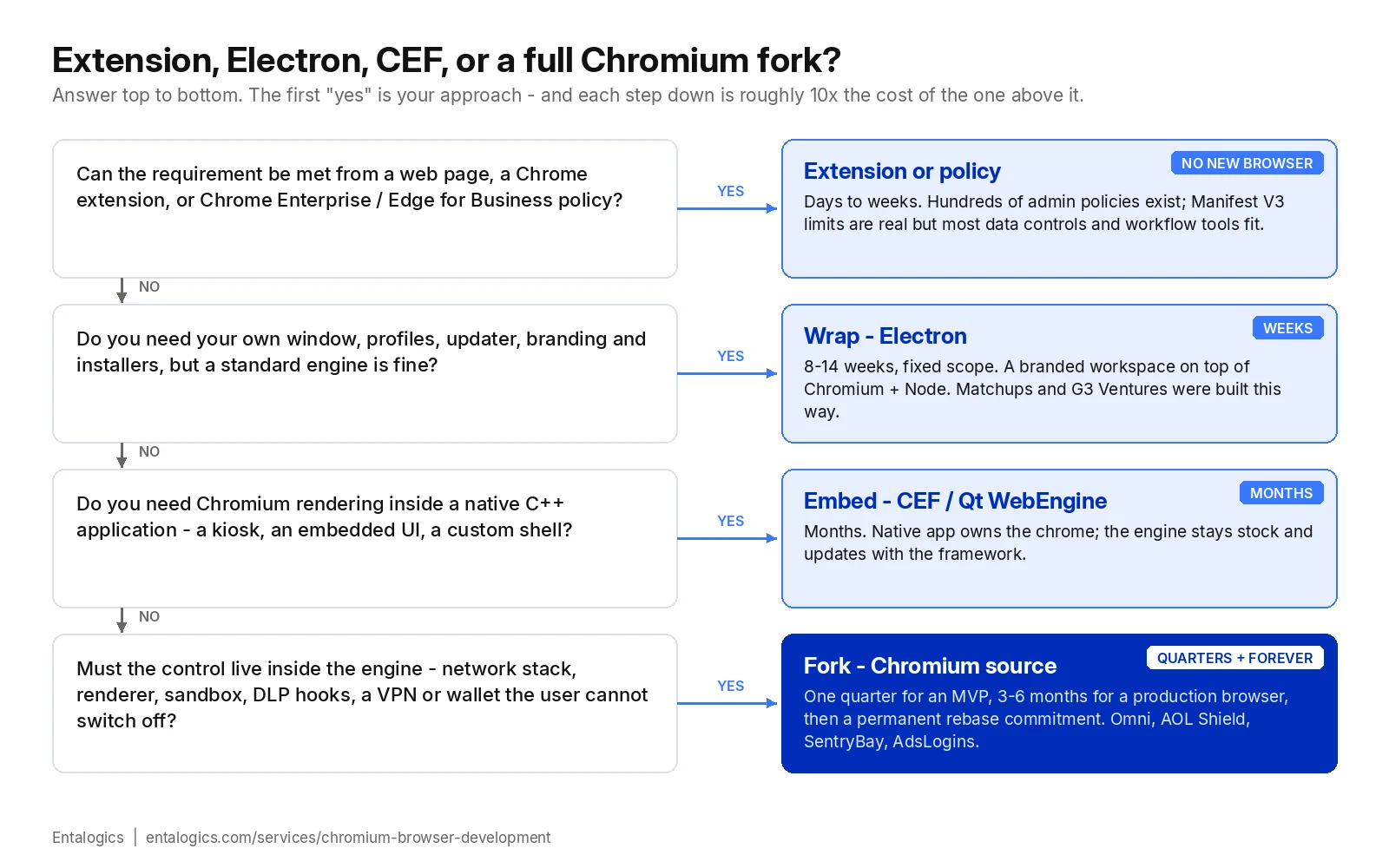
A note on "white-label browser". The phrase covers all four rows. A white-label browser for a telco or an ISP is usually a branded Electron workspace or a stock Chromium fork with branding, default bookmarks and a search deal — weeks of work. A white-label browser for a security vendor or a crypto platform is a real fork with engine-level features, because the branding is the least of it. Ask which one you're being sold before you compare prices.
The build infrastructure nobody budgets for
This is where fork projects quietly die. The Chromium source tree is enormous: the shared git cache alone is on the order of 30 GB, and a full checkout with dependencies is far larger. Chromium's own build documentation asks for at least 100 GB of free disk and recommends more than 16 GB of RAM, and warns that the initial fetch takes about 30 minutes on a fast connection and "many hours on slower ones" — and that's before you compile anything.
Compile times are the real cost. A clean build is measured in hours on serious hardware and in days on ordinary machines, and a browser business rebuilds on every platform it ships, for every milestone, forever. That means dedicated build hardware, a compilation setup that keeps incremental builds to minutes rather than hours, CI that can afford a Chromium build (most hosted CI cannot), artifact storage for rollback, and a separate toolchain for each operating system. iOS is a separate conversation (see FAQ).
Before writing a line of feature code, a serious fork has a week or two of infrastructure work and an ongoing hardware bill. Skip this and every upstream rebase becomes a multi-day fire drill. How we set this up — the hardware, the caching strategy, the CI layout — is part of every scoping call rather than something we publish.
Tracking upstream: the two-week problem
Chrome moved to a four-week stable cadence in 2021. Starting with Chrome 153 — stable on September 8, 2026 — it moves to two weeks: Google's announcement says a new beta and stable will ship every two weeks from that release, while Extended Stable "will continue with its existing eight-week cycle" for enterprise admins and Chromium embedders.
For a fork, that cadence is the maintenance contract. Every milestone you fetch upstream, re-apply your own changes, resolve whatever conflicts they cause, rebuild on every platform, test, sign, and ship through your own update channel. The more you've changed in Chromium itself, the more conflicts there are, and the more of the loop has to be done by a person instead of a machine.
Whether that loop takes one engineer a day or a team two weeks is decided in the first month of the project — by how the changes are structured, which release channel you track, and how much of the loop is automated before launch. Those decisions are the difference between a fork that survives and one that gets abandoned. They're also the part of our approach we keep for clients; we walk through them on the scoping call, not in a blog post.
Falling three milestones behind upstream means shipping known, published CVEs to your users. Falling six behind means the rebase is easier to abandon than finish.
We've inherited forks in that state; it's cheaper to prevent.
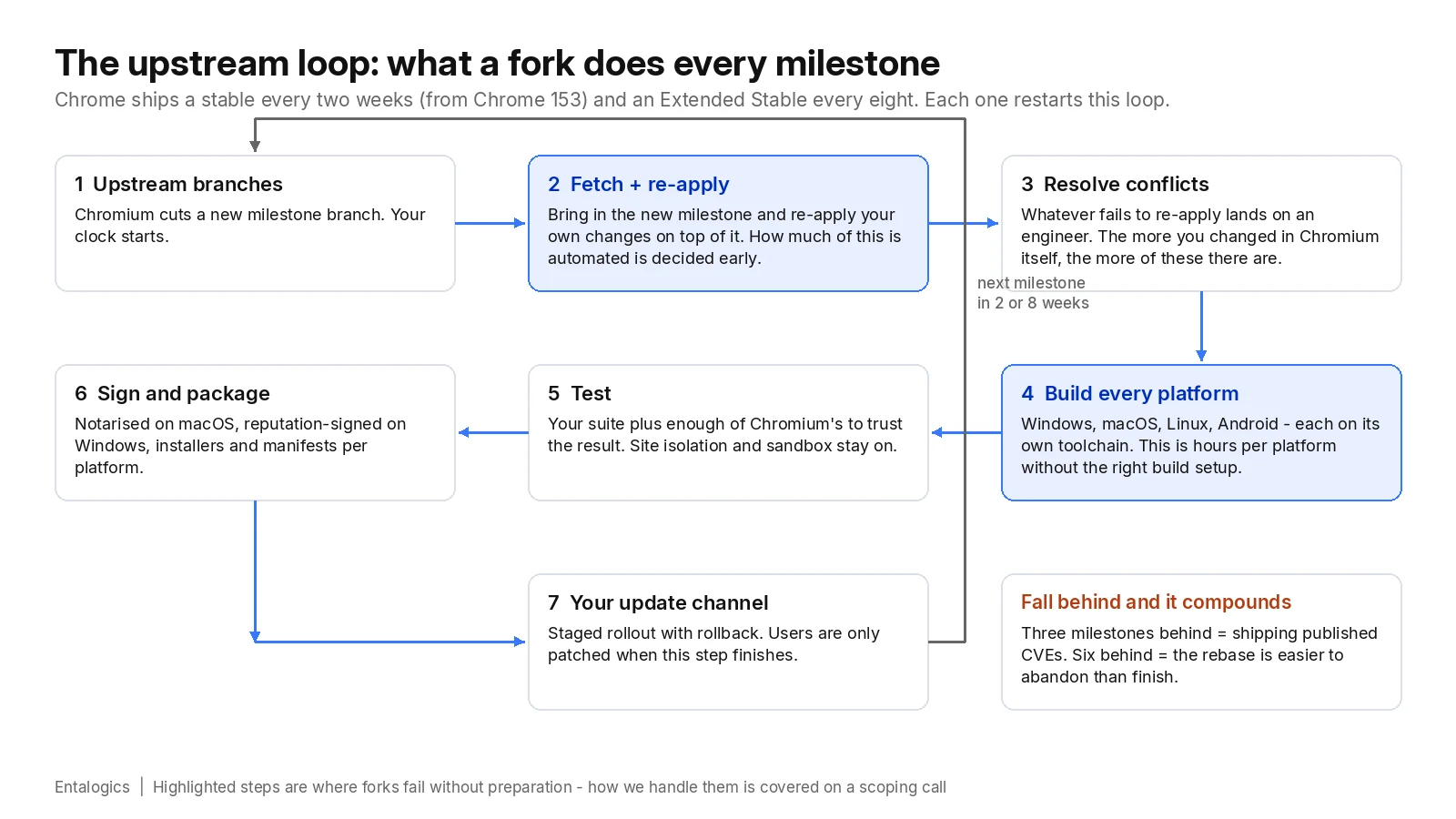
The two highlighted steps are where forks without preparation fall over. Everything else is ordinary release engineering.
Integrations we've actually shipped inside the browser
This is where a fork earns its keep. Things that can't be done from an extension:
Integrated VPN and crypto wallet. For Omni Browser we built directly into Chromium: a VPN that the browser controls (not a system-level client the user can bypass), and a crypto wallet as a first-class browser surface rather than an injected extension. Neither is possible from outside the engine.
Custom authentication in the engine. Digital Office: Aura needed the browser itself to gate access through a manual, custom authentication flow. That meant modifying Chromium internals so the auth step happens before the browser is usable, with no extension or web page the user can route around.
Isolated profiles and policy sync. G3 Ventures needed agents working in isolated profile workflows with policies synced centrally. We delivered that as a custom Electron browser — the wrap approach — because engine-level changes weren't required, and the client reported agent onboarding improved 55% after rollout.
Fingerprint control. A multi-account browser (Adslogins) that controls what a page can learn about the device, per profile, from inside the renderer — the kind of thing an extension can only approximate.
Hardened enterprise browser. SentryBay's browser: live threat controls, enterprise rollout, and a locked-down surface. Security operations got significantly faster because controls live in the browser instead of around it.
Extensions + web dashboard as one platform. RozmeriGPT and Veracross: Chrome extensions sharing prompts, billing, and analytics with a web app. Worth noting because it's the counter-example — neither needed a fork. See "when you shouldn't."
Every one of these is on our portfolio, with the client's own words. We link them because "we build browsers" is a claim; six shipped ones are evidence.
Ship faster with senior engineers
Direct collaboration, AI-augmented delivery, and no agency markup.
Get in touchHardening: what you strip, lock, and replace
A fork starts as Chrome with a different name. Making it yours means removing Google's services and replacing the update mechanism with your own; locking policy defaults so enterprise IT can layer its own on top; keeping the sandbox and site isolation switched on (some forks turn them off "for performance" and become the least secure browser on the machine); routing crash reports, usage and security events to your own pipeline, because enterprise buyers will ask where the data goes; and signing and notarising per platform so the operating system doesn't warn users away. Each of those is its own patch series and its own maintenance line.
The full hardening checklist we work through, and the order we do it in, is client material rather than public — ask for it on a call.
Then the part people forget: you now own the CVE response. When a Chromium zero-day is announced, your users are vulnerable until your rebased, rebuilt, signed build reaches them. That's why the build infrastructure and upstream tracking sections come before this one.
When you shouldn't fork Chromium
Being honest here is why clients trust us with the projects that do need a fork.
- You need policy, not a new browser. Chrome Enterprise and Edge for Business expose hundreds of policies. If your requirement is "block these sites, force these extensions, disable that feature," you need an admin console, not a fork.
- An extension can do it. Manifest V3 limits are real, but data controls, session monitoring, and workflow tooling often fit. The enterprise browser market itself is drifting toward extension- and agent-based approaches layered on standard Chrome and Edge — because full browser replacement is a heavy deployment ask.
- You want a branded workspace, not a new engine. That's Electron. Weeks, not quarters.
- You can't fund the maintenance. A fork with no rebase budget is a security incident on a timer. If the ongoing engineering isn't in the plan, don't start.
- iOS is the main target. Chromium's iOS build uses WebKit by App Store rule; you get Chromium's UI and sync layers, not Blink. Set expectations accordingly.
What a custom browser costs
We don't publish a price list for browser work, because two projects with the same one-line brief can differ by a factor of ten. What we can publish is the shape: how long each approach takes and what you keep paying for after launch. These are the frameworks we quote against, reconciled with our Chromium browser development page.
| Approach | Build timeline | After launch |
|---|---|---|
| Extension or Chrome Enterprise policy | Days to a few weeks | Manifest and policy changes only; Google maintains the engine |
| Electron wrap (branded workspace, profiles, updater, installers) | 8–14 weeks, fixed scope | Electron version bumps a few times a year; your own updater and signing certs |
| Embed (CEF / Qt WebEngine inside a native app) | 3–5 months | Framework updates on the framework's schedule; engine stays stock |
| Chromium fork, MVP (branding, service removal, first engine-level feature, update server, signed builds on two platforms) | One quarter, 12–16 weeks | See next row — this is the part people don't budget |
| Chromium fork, production (enterprise policy, multi-platform signing, self-hosted updates, hardening) | 3–6 months | A rebase every milestone you track, CVE response, toolchain changes: a retainer or a dedicated engineer, permanently |
| Rescue (inherited fork, several milestones behind) | 10–16 weeks after a two-week audit | Same as production |
Four things move the number more than anything else:
Ongoing maintenance is the line that decides whether a fork is a good idea. Budget for a rebase every milestone you track, a fast path for CVE hotfixes, and platform toolchain changes. This is a retainer or a dedicated engineer, not a one-off, and it's why our service page is split into a fixed-quote build and a fixed-scope monthly retainer rather than hourly billing.
Rescue engagements start with an audit: how big is the diff, how far behind, what's actually load-bearing. Sometimes the answer is "rebase"; sometimes it's "re-fork and port the three features that matter." We quote after the audit, not from a form.
How we'd start your project
The detail behind steps 2 and 3 is where the six browsers' worth of lessons live. It's what you get on the call.
Building a browser, or inheriting one? Talk to the team that's shipped six. See custom Chromium browser development, or hire Chromium browser developers directly. If the honest answer is "you need Electron" or "you need an extension," we'll say so on the first call.
Sources: Chrome for Developers, Get features faster with Chrome's two-week release cycle; Chromium, Checking out and building Chromium on Linux (system requirements); Chromium, Windows build instructions. Timelines are Entalogics' own delivery frameworks across six shipped browsers; individual projects are quoted after scoping.