
ShopEase – Android E-Commerce App
A native Android shopping app for NovaCart Retail — browsing, cart, wishlist, and order tracking built on Kotlin, Firebase, and a Room Database cache.
 Kotlin
 Android Studio
 Firebase
 REST API
 Room Database
Case study
Project Overview
NovaCart Retail needed a modern Android storefront — something customers could browse, search, and buy from without friction, and something the team could keep extending as the catalog grew.
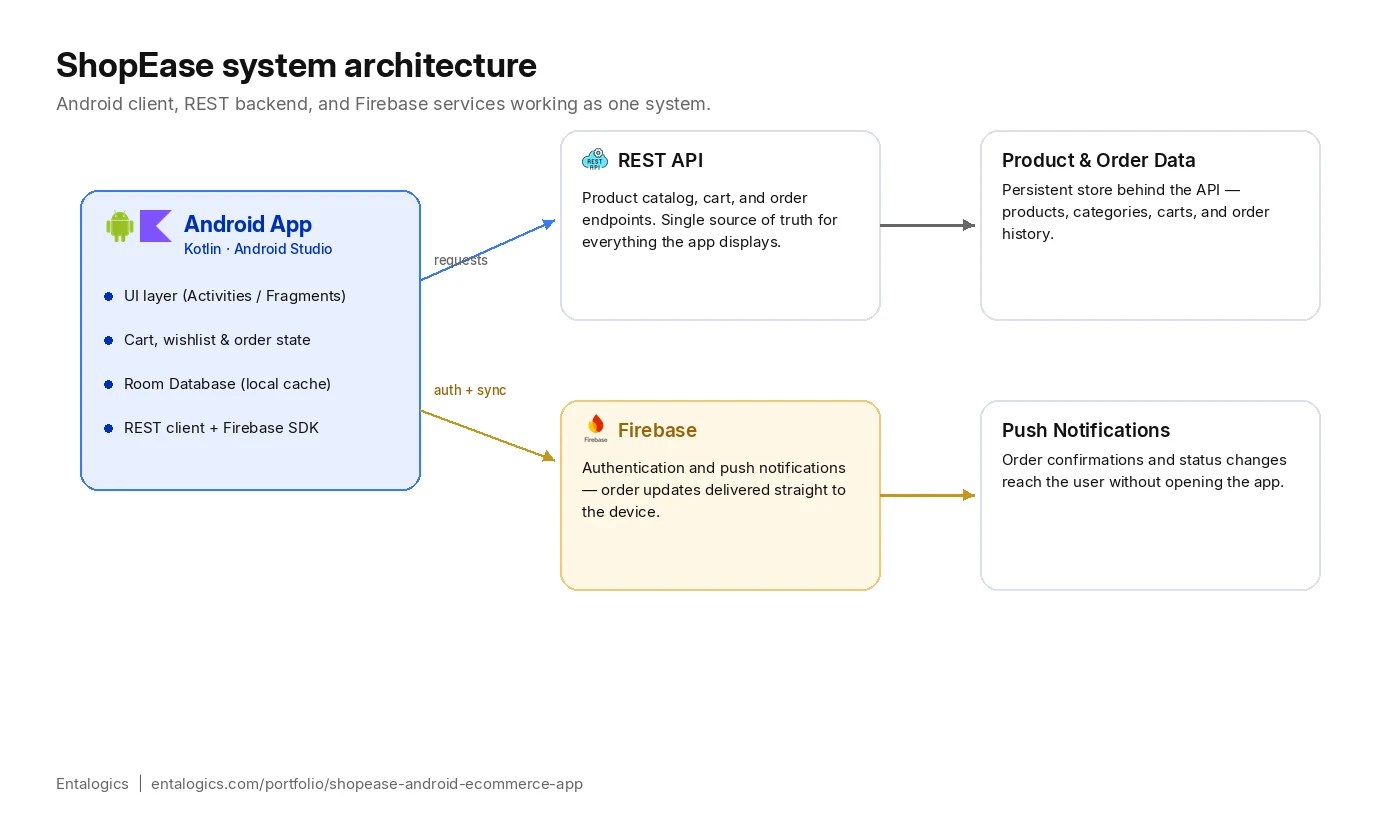
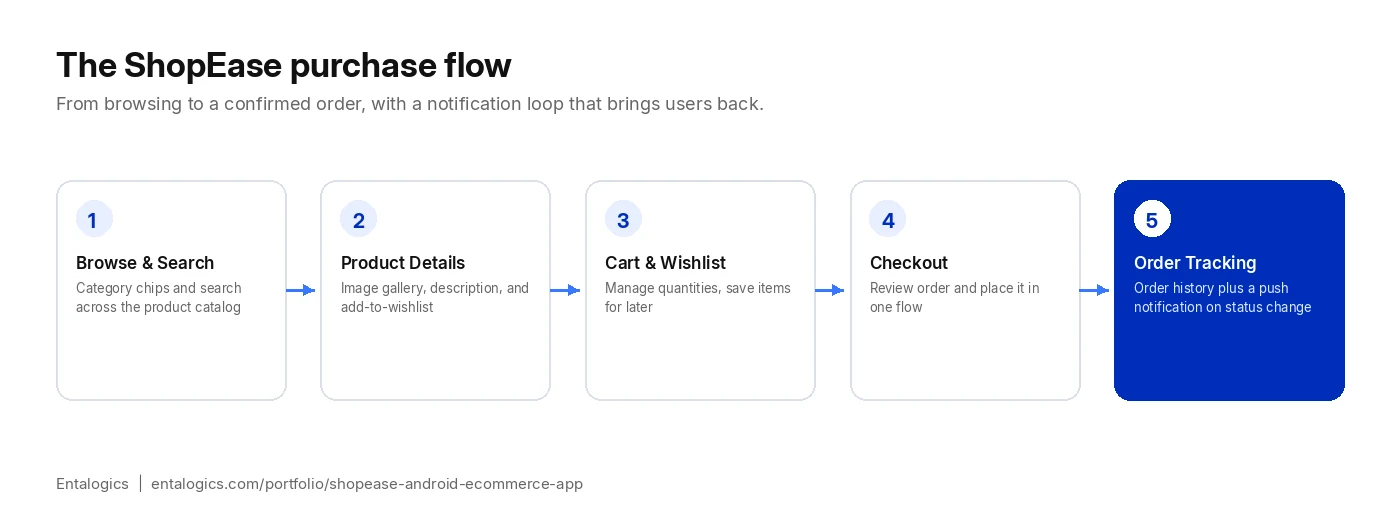
We built ShopEase as a native Kotlin application: product listings with category filters and search, a full product detail view with an image gallery, a cart and wishlist that persist locally, and an order history screen backed by a REST API. Firebase handles push notifications, so customers hear about order updates without needing to reopen the app.
A Room Database sits underneath the REST layer as a local cache, so product and cart data are available instantly on repeat visits and the app stays usable through flaky connections rather than stalling on every screen.
Scope
What We Built
Account & Authentication
- User registration and secure login
- Session handling wired into the rest of the app’s data layer
Product Discovery
- Category browsing and keyword search
- Product detail pages with a full image gallery
Cart & Wishlist
- Add or remove products from the cart at any point
- Wishlist for items customers want to save for later
Orders & Notifications
- Order placement flow and a full order history screen
- Firebase push notifications for order and status updates
Data Layer
- REST API integration for product and order management
- Room Database for local storage and offline-friendly performance
- Responsive layout tested across different Android screen sizes
Architecture
Why Room Database, Not Just a REST Cache
It would have been faster to build ShopEase against the REST API directly and cache responses in memory. That works fine in a demo and falls apart the moment a customer opens the app on a train, in an elevator, or anywhere else the connection drops mid-browse.
Room sits underneath the REST layer as the actual source of truth for what the UI renders. The app always reads from the local database first, and network calls exist to keep that database current — not to serve the screen directly. That single decision is what makes browsing, adding to cart, and reviewing the wishlist feel instant regardless of connection quality, and it’s what lets the cart survive a network drop mid-checkout without extra special-casing.
The tradeoff is real: two layers to keep in sync instead of one, and more careful handling of what happens when a local write and a server response disagree. For a shopping app where losing a cart item is a lost sale, that tradeoff was worth making from day one rather than bolting on later.
Deep dive
Technical Challenges
Three decisions shaped how ShopEase holds up under real, everyday use.
Keeping the cart and wishlist consistent offline
Cart and wishlist state has to feel instant and never lose an item, even when the network drops mid-session. Room Database sits as a local source of truth beneath the REST layer, so the UI reads and writes locally first and reconciles with the server in the background — rather than every tap depending on a live connection.
Notifications that stay accurate
Order status can change server-side at any time, and the notification shown on the device has to match what the order history screen displays when the customer opens the app. Firebase push notifications and the REST-backed order history are kept in sync off the same order-state source, so the two never contradict each other.
Keeping product image galleries smooth on mid-range devices
NovaCart’s catalog leans on photography — several images per product — and Android’s memory budget on mid-range devices punishes anything that loads full-resolution images into a scrolling list. Product images are decoded at the size they’re actually displayed at and recycled aggressively as the user scrolls, rather than relying on default image-loading behavior, so the gallery stays smooth without requiring a high-end device to do it.
Outcomes
Results
- Full shopping flow shipped end to end — browse, search, cart, wishlist, checkout, order history
- Firebase push notifications keep customers updated without reopening the app
- Room Database cache keeps product and cart data available through weak connections
- Responsive layout verified across a range of Android screen sizes
- Structured, component-based architecture built for adding new features without a rewrite
- Product image galleries stay smooth scrolling on mid-range Android hardware, not just flagship devices