
FitTrack – Android Fitness & Activity App
A native Android fitness app for ActiveLife Wellness — activity tracking, workout plans, and progress charts built on Kotlin, Google Fit, and Firebase.
 Kotlin
 Android Studio
 FirebaseGoogle Fit API
 Room / SQLite
Case study
Project Overview
ActiveLife Wellness wanted an app that did more than log a workout — something that helped people actually keep a routine going, day after day.
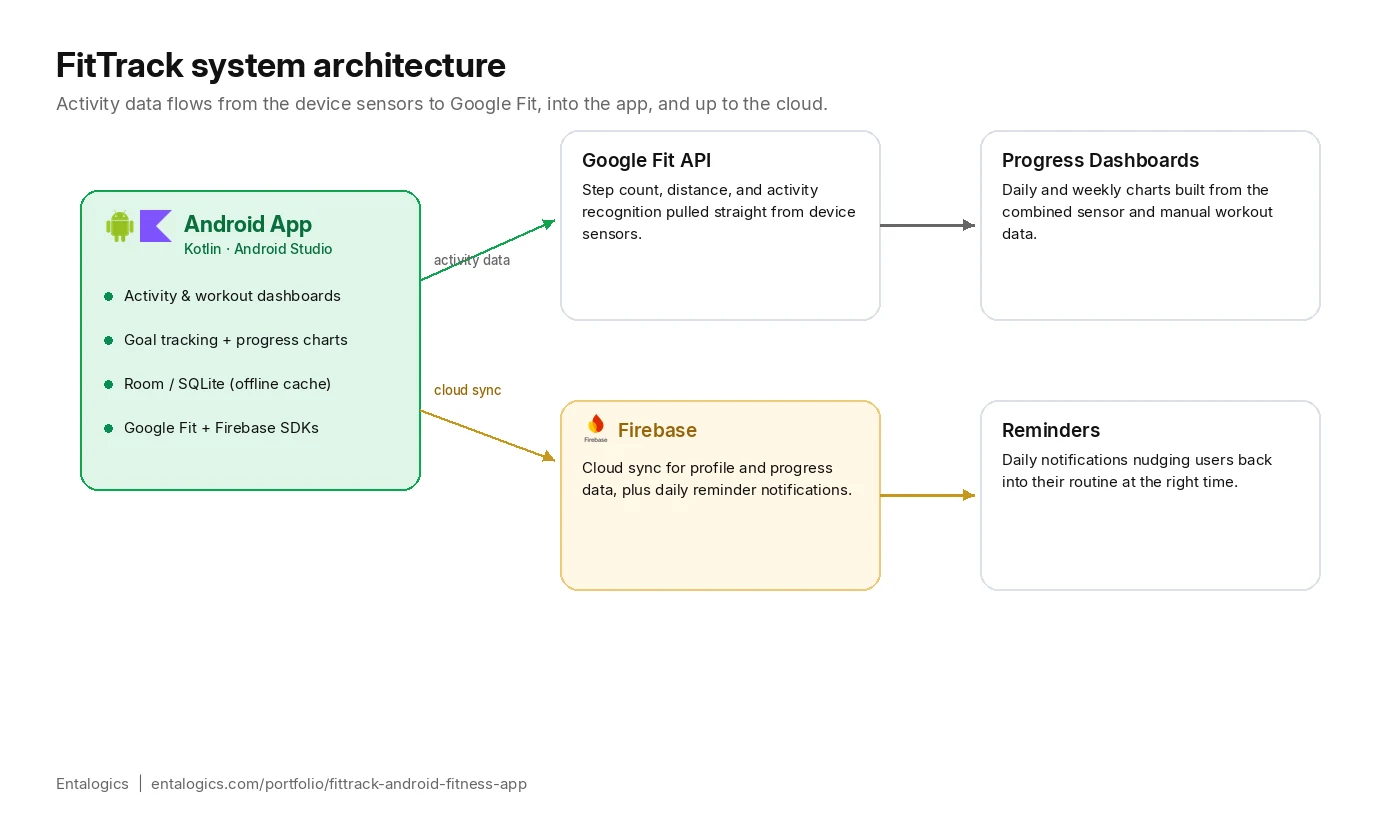
We built FitTrack as a native Kotlin app on top of the Google Fit API: daily step and activity tracking, workout and exercise plans, calorie and activity monitoring, and personal fitness goals with progress charts and full workout history. Firebase syncs a user’s data to the cloud and drives daily reminder notifications, while Room Database keeps everything usable offline.
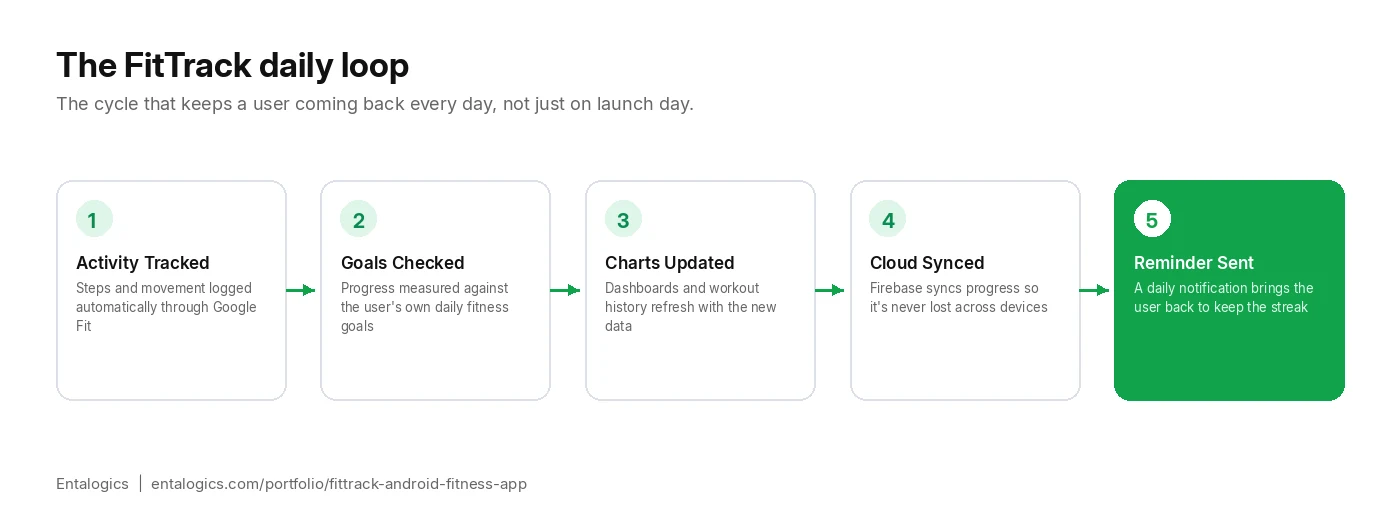
The goal wasn’t just tracking numbers — it was giving users a clear, honest picture of their progress and a reason to open the app again tomorrow.
Scope
What We Built
Activity Tracking
- Daily step and movement tracking via the Google Fit API
- Calorie and activity monitoring throughout the day
Workouts & Goals
- Workout and exercise plans built into the app
- Personal fitness goals with progress tracked against them
- Full workout history for every completed session
Progress & Engagement
- Progress charts and statistics summarizing daily and weekly activity
- Daily reminders and notifications to keep routines consistent
Account & Data
- User registration and profile management
- Firebase cloud data synchronization across sessions
- Offline support using Room Database — tracking keeps working without a connection
Architecture
Why Google Fit Is the Source of Truth
The tempting shortcut on a fitness app is to write your own step-counting and activity-recognition logic against the phone’s raw sensors. It’s also the fastest way to end up with numbers that quietly drift from whatever the user’s phone or watch already tells them — and disagreeing with a user’s own device is the quickest way to lose their trust in a fitness app.
FitTrack treats the Google Fit API as the single source of truth for raw activity — steps, distance, active minutes — and builds goal tracking, workout plans, and progress charts as a layer on top rather than a replacement. That means FitTrack’s numbers agree with whatever else is already reading the same sensor data on a user’s device, which matters more to daily trust than any extra feature could.
The cost is giving up some control: activity recognition happens on Google’s timeline, not ours, so occasional correction of past data has to be handled gracefully rather than assumed away. For a habit-tracking app, that’s a fair trade for numbers people can actually rely on.
Deep dive
Technical Challenges
Three things had to work reliably for FitTrack to be useful day to day, not just on install day.
Reconciling Google Fit data with in-app state
Google Fit reports activity from multiple sources — the phone’s own sensors, connected wearables, manually logged workouts — and that data can arrive out of order or get corrected after the fact. The app treats Google Fit as the source of truth for raw activity and layers its own goal-tracking and workout-plan state on top, rather than trying to recompute activity numbers itself.
Making offline tracking feel seamless
Fitness tracking has to keep working on a run with no signal. Room Database stores activity and workout data locally as it’s recorded, with Firebase sync happening in the background once a connection is available — so a user never sees a broken dashboard just because they were offline when they exercised.
Trusting activity data that can be corrected after the fact
Google Fit will sometimes retroactively adjust a day’s step count once more sensor data or a connected wearable syncs in — a run logged an hour ago might get revised. FitTrack’s progress charts and goal-completion state recompute from Google Fit’s current numbers rather than freezing what was shown at the moment of tracking, so a user’s daily progress stays accurate even after a correction instead of quietly going stale.
Outcomes
Results
- Full activity, workout, and goal-tracking flow shipped end to end
- Progress charts and workout history giving users a clear view of trends over time
- Firebase cloud sync keeping data consistent across sessions
- Offline-first tracking via Room Database — no dependency on a live connection mid-workout
- Daily reminders built in to support consistent routines rather than one-off use
- Progress data stays accurate even when Google Fit revises earlier activity after the fact